


The Program Can’t Start Because MSVCP140.Dll Is Missing From Your Computer
By Timothy Tibbettson 06/15/2023 |
MSVCP140.dll Is Missing error can be frustrating because you're often told it's missing, but not shown how to fix the problem. The reason for the MSVCP140.dll error is because you don't have the correct Visual C++ libraries installed for the program causing the error and it's simple to fix.
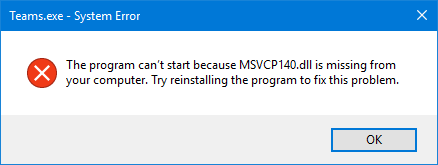
Visual C++ Libraries (or runtimes) are the end-user files for any program, app, or game written in Visual C++. The end user, of course, has no idea what language a program is written in or that they need the runtimes. This only adds to the frustration with the MSVCP140.dll error.
Adding to the Visual C++ confusion is that there are numerous versions named by year going back to 2005. Let's try and sort out the confusion.
You're going to want to try the official Microsoft Visual C++ Redistributable Package. This should fix most problems.
One problem this might not solve is if you need an older version of the Microsoft Visual C++ runtimes. This is a solution to look at if you're getting this error when running an older app or game. There are at least two third-party apps that will install all of the Microsoft Visual C++ runtimes. While this may seem like overkill, it's helped more people than not.
Visual C++ Runtime Installer (All-In-One)
Visual C++ Runtime Installer (All-In-One) is a single batch file installer that includes all Visual C++ libraries built in, and a video tutorial is available.
MultiPack Visual C++ Installer
MultiPack Visual C++ Installer is designed to install all of the Microsoft Visual C++ end-user runtimes simply. Run the app, and it installs everything for you.
If you do have the MSVCP140.Dll on your computer you might try to re-register it.
Hopefully, we solved the MSVCP140.dll error for you.
comments powered by Disqus
Visual C++ Libraries (or runtimes) are the end-user files for any program, app, or game written in Visual C++. The end user, of course, has no idea what language a program is written in or that they need the runtimes. This only adds to the frustration with the MSVCP140.dll error.
Adding to the Visual C++ confusion is that there are numerous versions named by year going back to 2005. Let's try and sort out the confusion.
You're going to want to try the official Microsoft Visual C++ Redistributable Package. This should fix most problems.
One problem this might not solve is if you need an older version of the Microsoft Visual C++ runtimes. This is a solution to look at if you're getting this error when running an older app or game. There are at least two third-party apps that will install all of the Microsoft Visual C++ runtimes. While this may seem like overkill, it's helped more people than not.
Visual C++ Runtime Installer (All-In-One)
Visual C++ Runtime Installer (All-In-One) is a single batch file installer that includes all Visual C++ libraries built in, and a video tutorial is available.
MultiPack Visual C++ Installer
MultiPack Visual C++ Installer is designed to install all of the Microsoft Visual C++ end-user runtimes simply. Run the app, and it installs everything for you.
If you do have the MSVCP140.Dll on your computer you might try to re-register it.
Hopefully, we solved the MSVCP140.dll error for you.
comments powered by Disqus
