


Thumbcache Viewer Permits Thumbnail Image Extraction From Database Files
By Timothy Tibbettson 07/12/2023 |
Thumbcache Viewer is a portable app that permits extracting thumbnail images from the thumbcache_*.db and iconcache_*.db database files.
-=- Advertisement -=-
The interface is simple and straightforward allowing you to open files using either your file browser or via drag n' drop. The displayed listing displays the name, size, data and header checksums. It also provides the entry hash and location for each line item. You also have the option to preview items from the main-frame before saving them which can be performed from the context menu. And for expediency, you have the opportunity to save multiple files simultaneously.
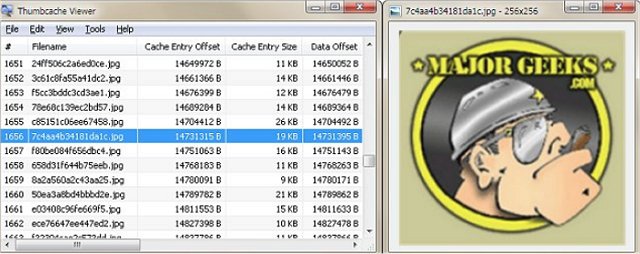
Thumbcache Viewer is set up to be easy-to-use and will be comfortable for even the most novice of users. The program comes in two flavors: graphical user interfaces for both 32 and 64 bit as well as a command-line interface all of which are included in the MajorGeeks download for your convenience.
Command-line example: thumbcache_viewer_cmd.exe thumbcache_32.db
There are additional options that can be specified to allow you to generate various reports of the database content.
The following is a list of supported options:
-o Sets the output directory for thumbnails and reports.
-w Generates an HTML report.
-c Generates a CSV (comma-separated values) report.
-z Excludes 0-byte files in the generated reports.
-n Prevents thumbnail images from being extracted.
Example: thumbcache_viewer_cmd.exe -o Output -w -c -z -n thumbcache_32.db
Download @ https://www.majorgeeks.com/files/details/thumbcache_viewer.html
 TIP:
TIP: The interface is simple and straightforward allowing you to open files using either your file browser or via drag n' drop. The displayed listing displays the name, size, data and header checksums. It also provides the entry hash and location for each line item. You also have the option to preview items from the main-frame before saving them which can be performed from the context menu. And for expediency, you have the opportunity to save multiple files simultaneously.
Thumbcache Viewer is set up to be easy-to-use and will be comfortable for even the most novice of users. The program comes in two flavors: graphical user interfaces for both 32 and 64 bit as well as a command-line interface all of which are included in the MajorGeeks download for your convenience.
Command-line example: thumbcache_viewer_cmd.exe thumbcache_32.db
There are additional options that can be specified to allow you to generate various reports of the database content.
The following is a list of supported options:
-o Sets the output directory for thumbnails and reports.
-w Generates an HTML report.
-c Generates a CSV (comma-separated values) report.
-z Excludes 0-byte files in the generated reports.
-n Prevents thumbnail images from being extracted.
Example: thumbcache_viewer_cmd.exe -o Output -w -c -z -n thumbcache_32.db
Download @ https://www.majorgeeks.com/files/details/thumbcache_viewer.html
