


Troubleshooting Microsoft .NET Framework Installations and Uninstallations
By Timothy Tibbettson 06/19/2023 |
The Microsoft .Net Framework is required by many applications and should be installed and updated with Windows Update. When you have a problem, Windows will give you a summary as to what's wrong, but not how to fix the problem. Should your installation be blocked using the web or offline installers, there are many possible explanations why.
Before you start searching, be sure that your Windows Updates are current. There are also a handful of utilities available to verify, set up, or clean up your current .Net installation, so we'll start with those and then go over all the error messages.
MajorGeeks does have many tools available that can repair, verify, and cleanup, Microsoft .Net Framework and, of course, the Redistributable.
Microsoft .NET Framework Redistributable Package
Microsoft .NET Framework Repair Tool
.NET Framework Setup Verification Utility
Microsoft .NET Framework Cleanup Tool
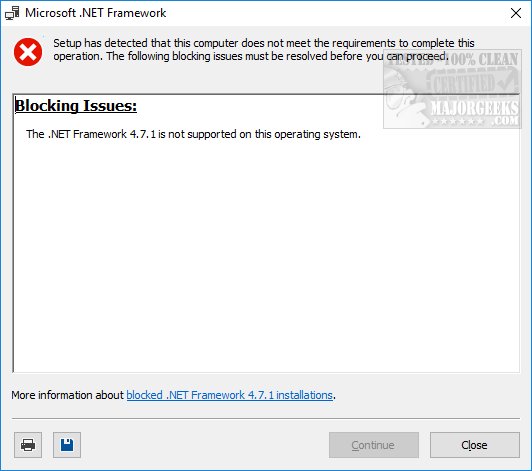
The .NET Framework is not supported on this operating system
This error almost always means that you don't have all your Windows Updates installed. Please check your Control Panel for Updates. We also ran into this problem with a clean Windows 10 installation that wasn't validated. If you don't have a legit copy of Windows, many features, including .Net, will be blocked.
Can not uninstall the .NET Framework. Other applications on your computer are dependent on this program
This error is designed to warn you that uninstalling .Net could cause other programs to stop working. Often, uninstalling the .Net Framework is a bad idea. Instead, be sure you have the latest version.
The .NET Framework redistributable does not apply to this operating system. Please download the .NET Framework for your operating system from the Microsoft Download Center.
This error is self-explanatory, we hope. Odds are you're trying to install a specific version of .Net, and it's not compatible.
The update corresponding to KB(number) needs to be installed before you can install this product
Another error that would be solved if all of your Windows Updates are current.
You do not have sufficient privileges to complete this operation for all users of this computer. Log on as an administrator and rerun Setup
Another obvious error message. You need to be able to log in as an administrator. If you're in a corporate environment, you'll need to find the IT guy.
Setup cannot continue because a previous installation requires your computer to be restarted. Please restart your computer and rerun Setup
Guess what? Another Windows Updates error. Reboot your computer to complete the last Windows Updates.
.NET Framework has not been installed because the component store has been corrupted
There's little to no information available for this error, but if you run the Windows Update Troubleshooter that should fix your problem.
Setup cannot run because the Windows Installer Service is not available on this computer
This error is specific to Windows 7 and Vista only. There are three possible fixes; all can be found here.
Setup may not run properly because the Windows Update Service is not available on this computer
Yup. Windows Updates again. Be sure Windows Updates are turned on and current.
Setup may not run properly because the Background Intelligent Transfer Service (BITS) is not available on this computer
A Windows Vista specific error. Please see this page if you're running Vista.
Setup may not run properly because Windows update encountered an error and displayed error code 0x80070643 or 0x643
Windows Update Troubleshooter should fix your problem.
The .NET Framework is already a part of this operating system. You do not need to install the .NET Framework redistributable.
Windows thinks everything is OK. If you have applications causing errors, your best bet is to be sure you have the latest .Net installed. If you do, try to uninstall and reinstall .Net.
The .NET Framework is not supported on this operating system
This error almost always applies to Windows 7. This is always a Windows Update error as well, specifically that the latest Service Pack for Windows 7 has not been installed.
This setup program requires an x86 or x64 computer
You can find system requirements here, but once again, this is a very uncommon error that should be resolved by Windows Updates.
We hope that you found your solution. Feedback so we can update if needed, is always welcomed.
comments powered by Disqus
Before you start searching, be sure that your Windows Updates are current. There are also a handful of utilities available to verify, set up, or clean up your current .Net installation, so we'll start with those and then go over all the error messages.
MajorGeeks does have many tools available that can repair, verify, and cleanup, Microsoft .Net Framework and, of course, the Redistributable.
Microsoft .NET Framework Redistributable Package
Microsoft .NET Framework Repair Tool
.NET Framework Setup Verification Utility
Microsoft .NET Framework Cleanup Tool
The .NET Framework is not supported on this operating system
This error almost always means that you don't have all your Windows Updates installed. Please check your Control Panel for Updates. We also ran into this problem with a clean Windows 10 installation that wasn't validated. If you don't have a legit copy of Windows, many features, including .Net, will be blocked.
Can not uninstall the .NET Framework. Other applications on your computer are dependent on this program
This error is designed to warn you that uninstalling .Net could cause other programs to stop working. Often, uninstalling the .Net Framework is a bad idea. Instead, be sure you have the latest version.
The .NET Framework redistributable does not apply to this operating system. Please download the .NET Framework for your operating system from the Microsoft Download Center.
This error is self-explanatory, we hope. Odds are you're trying to install a specific version of .Net, and it's not compatible.
The update corresponding to KB(number) needs to be installed before you can install this product
Another error that would be solved if all of your Windows Updates are current.
You do not have sufficient privileges to complete this operation for all users of this computer. Log on as an administrator and rerun Setup
Another obvious error message. You need to be able to log in as an administrator. If you're in a corporate environment, you'll need to find the IT guy.
Setup cannot continue because a previous installation requires your computer to be restarted. Please restart your computer and rerun Setup
Guess what? Another Windows Updates error. Reboot your computer to complete the last Windows Updates.
.NET Framework has not been installed because the component store has been corrupted
There's little to no information available for this error, but if you run the Windows Update Troubleshooter that should fix your problem.
Setup cannot run because the Windows Installer Service is not available on this computer
This error is specific to Windows 7 and Vista only. There are three possible fixes; all can be found here.
Setup may not run properly because the Windows Update Service is not available on this computer
Yup. Windows Updates again. Be sure Windows Updates are turned on and current.
Setup may not run properly because the Background Intelligent Transfer Service (BITS) is not available on this computer
A Windows Vista specific error. Please see this page if you're running Vista.
Setup may not run properly because Windows update encountered an error and displayed error code 0x80070643 or 0x643
Windows Update Troubleshooter should fix your problem.
The .NET Framework is already a part of this operating system. You do not need to install the .NET Framework redistributable.
Windows thinks everything is OK. If you have applications causing errors, your best bet is to be sure you have the latest .Net installed. If you do, try to uninstall and reinstall .Net.
The .NET Framework is not supported on this operating system
This error almost always applies to Windows 7. This is always a Windows Update error as well, specifically that the latest Service Pack for Windows 7 has not been installed.
This setup program requires an x86 or x64 computer
You can find system requirements here, but once again, this is a very uncommon error that should be resolved by Windows Updates.
We hope that you found your solution. Feedback so we can update if needed, is always welcomed.
comments powered by Disqus
