


Two Ways to Chill Wine Without Watering It Down
By Timothy Tibbettson 06/15/2023 |
I've got a lot of friends who prefer their wine chilled and many who use ice cubes, which eventually begin to melt and water down the wine. Whether you drink your wine slowly, or it wasn't chilled yet, here are two ways to chill a glass of wine or keep it chilled.
1: Frozen Grapes or Another Fruit
Keep a bag of white or red grapes in the freezer, and when you grab that glass of wine, toss in a handful of grapes. By the time your glass of wine is gone, you should have a few grapes to enjoy.
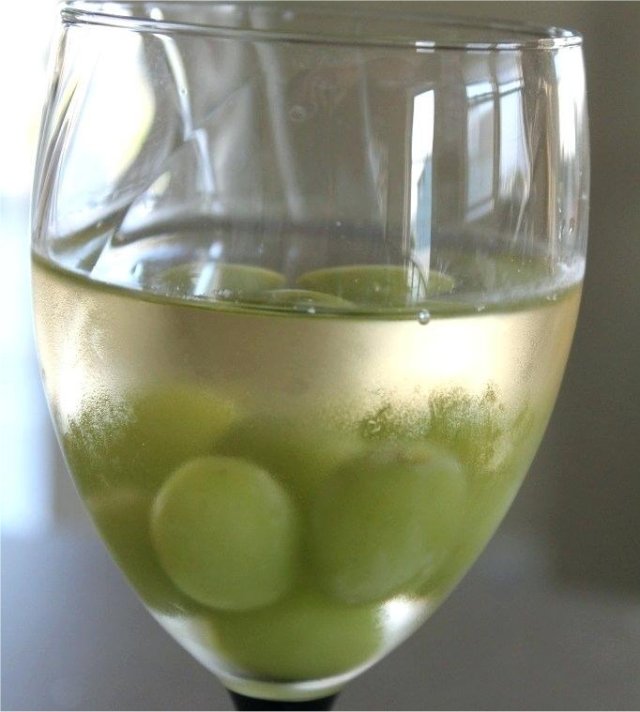
We're assuming if you like wine, you like grapes, but you can change it up by freezing other fruits.
Depending on the wine and your taste buds, you can try pineapple, pomegranate, cranberries, berries, peaches, or pineapple, for example.
2: Freeze Wine Cubes
If you usually drink the same wine, pour some wine into an ice cube tray and toss in a couple of cubes with your glass of wine. You can't freeze sparkling wine, but any red or white wine will freeze.
I wish I could freeze Jack Daniel's ice cubes.
Similar:
More Life Hacks & Reviews on MajorGeeks
More Windows How-Tos and Guides on MajorGeeks
comments powered by Disqus
1: Frozen Grapes or Another Fruit
Keep a bag of white or red grapes in the freezer, and when you grab that glass of wine, toss in a handful of grapes. By the time your glass of wine is gone, you should have a few grapes to enjoy.
We're assuming if you like wine, you like grapes, but you can change it up by freezing other fruits.
Depending on the wine and your taste buds, you can try pineapple, pomegranate, cranberries, berries, peaches, or pineapple, for example.
2: Freeze Wine Cubes
If you usually drink the same wine, pour some wine into an ice cube tray and toss in a couple of cubes with your glass of wine. You can't freeze sparkling wine, but any red or white wine will freeze.
I wish I could freeze Jack Daniel's ice cubes.
Similar:
comments powered by Disqus
