


How to Fix Unable to Connect to NVIDIA Error
By Timothy Tibbettson 06/15/2023 |
Rarely, an error might appear for NVIDIA graphic card owners stating "Unable to Connect to NVIDIA" and often followed by the additional message to "check your internet connection." Fixing this error is often simple. Here's how.
1: Check NvContainerNetworkService Service is Running
If you're uncomfortable or unfamiliar with editing Services, please proceed to step 2. Also, if you haven't updated your display driver for some time, also go directly to step 2. Press the Windows Key + S and type in Services and click on Services. Optionally, you can go to Start, Run or press the Windows Key + R and type in services.msc.
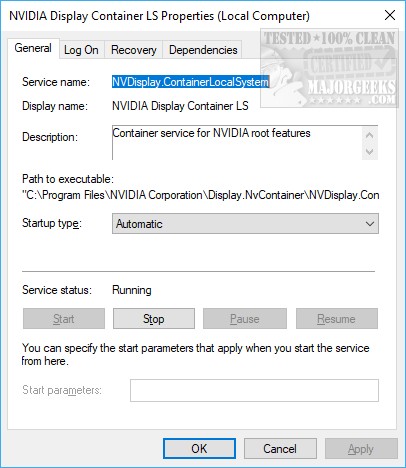
Scroll down and find either NVIDIA NetworkService Container or NVIDIA Display Container LS. Double-click whichever one you have. We want to check two things here.
Under Startup Type it should be automatic. If not, use the drop-down to change it to Automatic.
The Service Status should say Running. If not, click on Start.
If that didn't solve your problem, head to the next step.
2: Reinstall the NVIDIA Drivers
Reinstalling, or updating your drivers should restore all the settings including restoring a stopped or disabled service. You can uninstall your drivers first, but only if a simple reinstall fails. Download the latest drivers:
Download NVIDIA drivers for Windows 10
Download NVIDIA drivers for Windows 7 and 8
Double-click the file you downloaded and follow the prompts.
Similar:
How to Find a Missing NVIDIA Control Panel and Restore the Context Menu or Tray Icon
comments powered by Disqus
1: Check NvContainerNetworkService Service is Running
If you're uncomfortable or unfamiliar with editing Services, please proceed to step 2. Also, if you haven't updated your display driver for some time, also go directly to step 2. Press the Windows Key + S and type in Services and click on Services. Optionally, you can go to Start, Run or press the Windows Key + R and type in services.msc.
Scroll down and find either NVIDIA NetworkService Container or NVIDIA Display Container LS. Double-click whichever one you have. We want to check two things here.
Under Startup Type it should be automatic. If not, use the drop-down to change it to Automatic.
The Service Status should say Running. If not, click on Start.
If that didn't solve your problem, head to the next step.
2: Reinstall the NVIDIA Drivers
Reinstalling, or updating your drivers should restore all the settings including restoring a stopped or disabled service. You can uninstall your drivers first, but only if a simple reinstall fails. Download the latest drivers:
Download NVIDIA drivers for Windows 10
Download NVIDIA drivers for Windows 7 and 8
Double-click the file you downloaded and follow the prompts.
Similar:
How to Find a Missing NVIDIA Control Panel and Restore the Context Menu or Tray Icon
comments powered by Disqus
