


How to Upgrade Windows 10 Home to Windows 10 Professional
By Timothy Tibbettson 06/22/2023 |
If you are currently using Windows 10 Home and want to upgrade to Windows 10 Pro, here's all you need to know.
Before you upgrade from Home to Professional, it's important to be sure you need it. As simple as it may sound, Home is geared towards most home users, and pro is geared towards professionals and networking. You can compare the differences between the two here.
Two of the biggest features Windows 10 Home users might need are Local Security Policy or Group Policy Editor. You can enable them for free without upgrading. However, you will need to reenable them after a Feature update, usually once or twice a year. Both use the same script, which you can read about here.
To upgrade, you will need to purchase an upgrade or a new product key. Back in the day, we used to enter any one of hundreds of available keys on the internet. Today, activation through Microsoft is required, and you need a valid product key.
Video tutorial:
Let's get you to the upgrade page.
Do Cheap Windows 10 Keys Really Work?
Click on Start > Settings > System.
Click on About.
Click on Change product key or upgrade your edition of Windows.
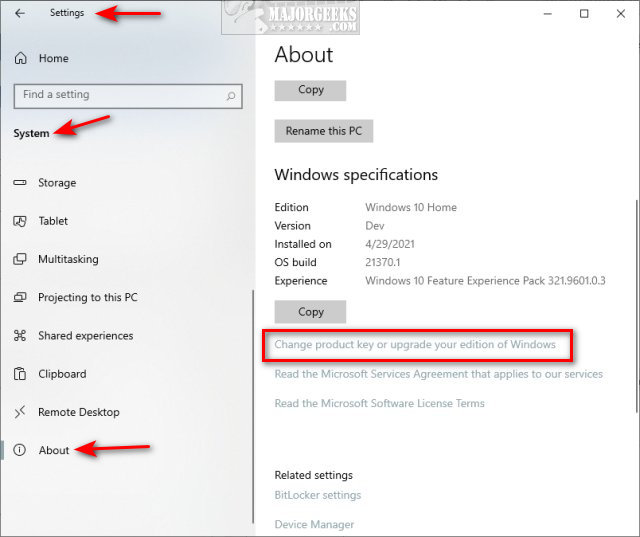
You should have two choices on an activated copy of Windows 10 Home:
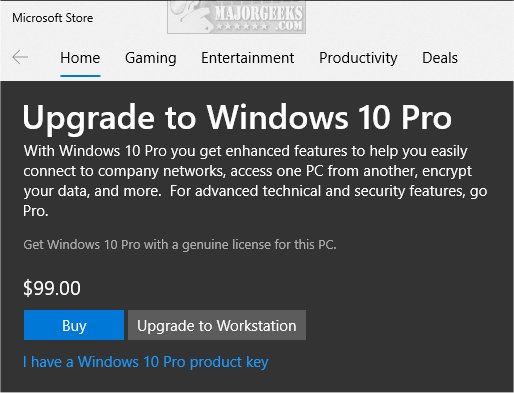
Go to the Store
This link opens the Microsoft Store. Upgrading to Windows 10 Professional costs $99 at the time of this article.
Change product key
You will be prompted to enter a valid Windows 10 Professional key. You can buy a cheap key on eBay or through a third-party website. The results can be hit or miss, but we have purchased keys for as little as $3-5 and had them last for years. For more information on acquiring a cheap key, see this article.
Our similar stories below might be of use as well.
Similar:
How-to Transfer Your Windows 10 License to Another Computer
Will Windows 10 Receive Windows Updates if It's Not Activated?
Can I Have Multiple Windows 10 or Microsoft Office Keys One One Account?
Retrieve Your Windows and Office Product Keys with These Free Apps
Do Cheap Windows 10 Keys Really Work?
comments powered by Disqus
Before you upgrade from Home to Professional, it's important to be sure you need it. As simple as it may sound, Home is geared towards most home users, and pro is geared towards professionals and networking. You can compare the differences between the two here.
Two of the biggest features Windows 10 Home users might need are Local Security Policy or Group Policy Editor. You can enable them for free without upgrading. However, you will need to reenable them after a Feature update, usually once or twice a year. Both use the same script, which you can read about here.
To upgrade, you will need to purchase an upgrade or a new product key. Back in the day, we used to enter any one of hundreds of available keys on the internet. Today, activation through Microsoft is required, and you need a valid product key.
Let's get you to the upgrade page.
Do Cheap Windows 10 Keys Really Work?
Click on Start > Settings > System.
Click on About.
Click on Change product key or upgrade your edition of Windows.
You should have two choices on an activated copy of Windows 10 Home:
This link opens the Microsoft Store. Upgrading to Windows 10 Professional costs $99 at the time of this article.
You will be prompted to enter a valid Windows 10 Professional key. You can buy a cheap key on eBay or through a third-party website. The results can be hit or miss, but we have purchased keys for as little as $3-5 and had them last for years. For more information on acquiring a cheap key, see this article.
Our similar stories below might be of use as well.
Similar:
comments powered by Disqus
