


Uplift Desk Review - The Ups and Downs
By Timothy Tibbettson 06/15/2023 |
You've undoubtedly heard or seen work desks that raise and lower so you can stand when working. I already own one standing desk I was happy with, but then I heard about Uplift Desks and decided to give them a try. In this review, we take a look at the ups and downs of buying an Uplift Desk.
Ordering - 5 Stars
Uplift has a ton of options. I added a few options, including a clamp-on surge protector, Advanced Digital Memory Keypad, and desk organizer. They gave me a free Motion X-Board, which you use to balance while standing. I accidentally forgot to order the computer tower mount, so I'll have to go back. By using the tower and surge protector mounts, everything is attached to the desk, so you don't worry about cords and cables moving.
With the options I chose, my Uplift desk cost $627. That's reasonable when a mediocre particle board desk could cost you at least $400. There are some very expensive, exotic if you will, desktops that can run the price much higher.
I placed my order with a promised ship time of 24 hours, and the desk shipped very close to the guaranteed time.
Shipping 5 Stars
My desk arrived four days later, on a Saturday, from Texas to Florida. My order arrived in three boxes.
Unboxing - 4.5 Stars
As mentioned, three boxes arrived. One box was the desktop; the other was marked as legs and frame. The last box came with the accessories I ordered and another box with more desk parts. There was no mention of where the instructions are. I found mine in a box, inside another box. I prefer a box with the hardware and manual to be marked.
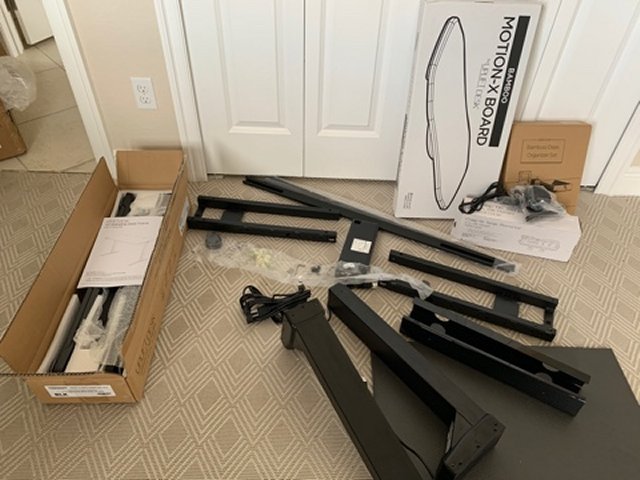
All of the parts were packed securely. I've seen many metal products come out of the box damaged or scratched, and I was happy with the packaging quality.
Expect to be impressed with the weight of the top and the parts which make up the desk frames.
Assembly - 4.0 Stars
Tools and hardware are all marked (H1, H2, H3), and finding the hardware you need was easy, thanks to the labeling.
Like any other self-assembly product, you'll want to follow the directions step-by-step. That can take a little longer with something you're unfamiliar with but worth the time. There were a few confusing spots, for example, which way the legs went on. There are cable holes in the desk, and they left those out of the diagram. I jumped ahead a couple of pages, and sure enough, I had them on backward.
A cable manager was included that you screw into the back of the desk, allowing you to hide all the wires. I plan to add the CPU holder later, allowing you to mount a tower under the desk and keep your wires hidden away.
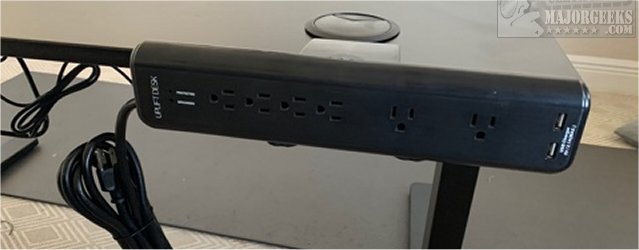
I also added a clamp-on surge protector that surprisingly, you couldn't clamp to the sides. I wouldn't have bought the surge protector ($59) had I known that.
When I turned the desk over, I was surprised that the screws had begun to break through the top of the desk.
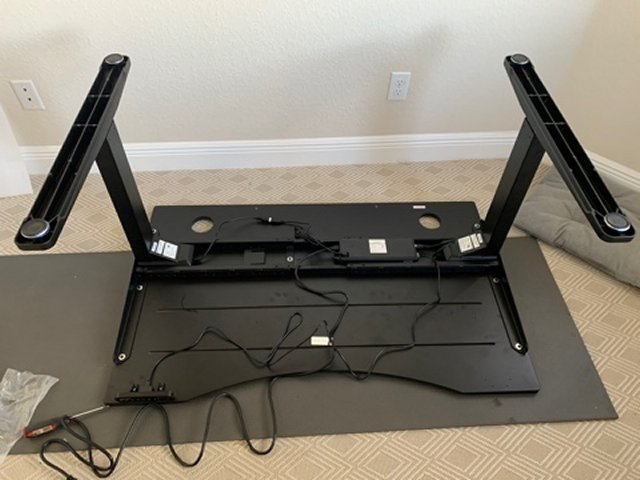
I can see at least six screws starting to show, with one beginning to crack the wood. You might think I overtightened the screws, but the holes were already drilled out for you, so that shouldn't happen.

My desk took about 1:15 to assemble, and it would have been faster if I had help.
Support - 3.5 Stars
Due to the screws showing up on my desktop, I was able to test Uplift support.
My phone call to support was answered within a minute on a Monday morning, and I received an email a minute later, as promised, to send a photo of the screws. I returned the email four days later, wondering why I hadn't heard anything. No response. I waited another three days, giving them one week to respond to my emails, and one again, no response. I would suggest calling, so perhaps that was my mistake, but it is 2020.
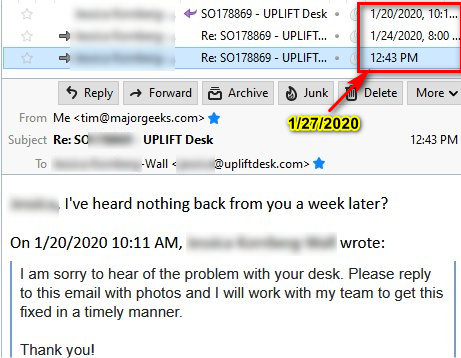
After posting to social media, I received a response from Uplift saying they always try and respond within 24 hours. They did want to know who I was dealing with and offered to make it right by sending me out a more expensive bamboo top the same day. In under 15 minutes, and after sending a photo of the damage, I had an order confirmation for my replacement upgraded desktop:

The bamboo top arrived the same week and looks incredible.
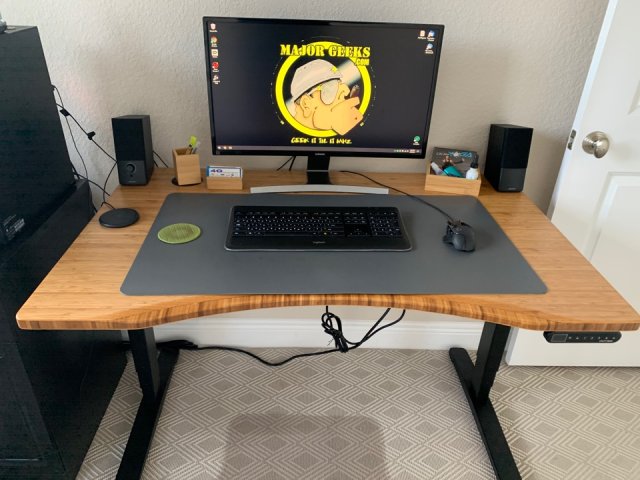
I feel confident that Uplift will stand tall when you need support, but I have no way to be sure.
First Use - 4 Stars
The Uplift desk is solid and stable, even over 45 inches high, which is my current position as I stand and write this review. As mentioned earlier, that legs are heavy, plus you have two motors adding weight and stability, although I don't see or hear a difference compared to my single motor desk.
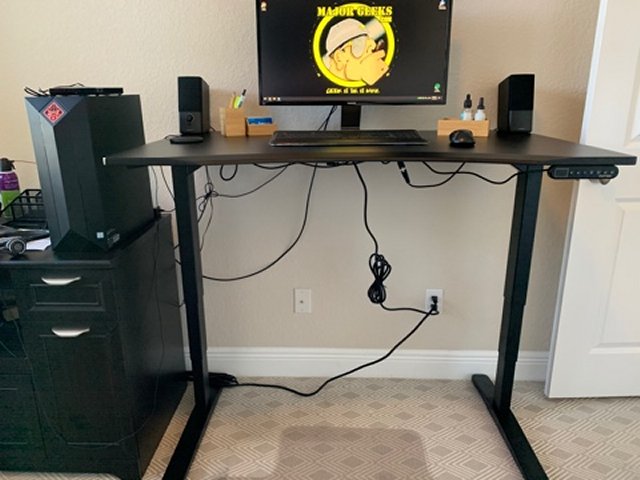
I would recommend the Advanced Digital Memory Keypad ($29), which includes a digital display and four memory positions.
Uplift also offers some free accessories. I picked the Bamboo Motion-X Board and the Bamboo Desk Organizer Set. I'm standing on the Motion-X board and getting a good work out in my legs and core while balancing.
We thought that the keyboard slid around too easily. We purchased a desktop pad to keep our keyboard from sliding around, available at any office supply store.
Summary - 4.0 Stars
Uplift makes an excellent desk at a reasonable price unless you start adding accessories, some that come standard on other desks. You can spend well over $1000 if you wanted a bamboo top and lots of accessories, but you can also buy a basic desk for under $600 and add on accessories later.
The Uplift desk met with nods of approval from people who saw it for the first time. People like the way it looks, and so do I.
The Uplift is a very well built desk, but the assembly directions could use a few tweaks, and the screws shouldn't be long enough to go through the desktop, although I've seen that before.
Summary
Pros:
Looks great
Lots of options and fast shipping
Strong and stable, even at tall heights
Cons:
Assembly directions need updating
Laminate tops can be a bit slippery for keyboards and mice
Not sure if support is always this slow
Some optional features (power and a memory keypad) should be standard
comments powered by Disqus
Ordering - 5 Stars
Uplift has a ton of options. I added a few options, including a clamp-on surge protector, Advanced Digital Memory Keypad, and desk organizer. They gave me a free Motion X-Board, which you use to balance while standing. I accidentally forgot to order the computer tower mount, so I'll have to go back. By using the tower and surge protector mounts, everything is attached to the desk, so you don't worry about cords and cables moving.
With the options I chose, my Uplift desk cost $627. That's reasonable when a mediocre particle board desk could cost you at least $400. There are some very expensive, exotic if you will, desktops that can run the price much higher.
I placed my order with a promised ship time of 24 hours, and the desk shipped very close to the guaranteed time.
Shipping 5 Stars
My desk arrived four days later, on a Saturday, from Texas to Florida. My order arrived in three boxes.
Unboxing - 4.5 Stars
As mentioned, three boxes arrived. One box was the desktop; the other was marked as legs and frame. The last box came with the accessories I ordered and another box with more desk parts. There was no mention of where the instructions are. I found mine in a box, inside another box. I prefer a box with the hardware and manual to be marked.
All of the parts were packed securely. I've seen many metal products come out of the box damaged or scratched, and I was happy with the packaging quality.
Expect to be impressed with the weight of the top and the parts which make up the desk frames.
Assembly - 4.0 Stars
Tools and hardware are all marked (H1, H2, H3), and finding the hardware you need was easy, thanks to the labeling.
Like any other self-assembly product, you'll want to follow the directions step-by-step. That can take a little longer with something you're unfamiliar with but worth the time. There were a few confusing spots, for example, which way the legs went on. There are cable holes in the desk, and they left those out of the diagram. I jumped ahead a couple of pages, and sure enough, I had them on backward.
A cable manager was included that you screw into the back of the desk, allowing you to hide all the wires. I plan to add the CPU holder later, allowing you to mount a tower under the desk and keep your wires hidden away.
I also added a clamp-on surge protector that surprisingly, you couldn't clamp to the sides. I wouldn't have bought the surge protector ($59) had I known that.
When I turned the desk over, I was surprised that the screws had begun to break through the top of the desk.
I can see at least six screws starting to show, with one beginning to crack the wood. You might think I overtightened the screws, but the holes were already drilled out for you, so that shouldn't happen.
My desk took about 1:15 to assemble, and it would have been faster if I had help.
Support - 3.5 Stars
Due to the screws showing up on my desktop, I was able to test Uplift support.
My phone call to support was answered within a minute on a Monday morning, and I received an email a minute later, as promised, to send a photo of the screws. I returned the email four days later, wondering why I hadn't heard anything. No response. I waited another three days, giving them one week to respond to my emails, and one again, no response. I would suggest calling, so perhaps that was my mistake, but it is 2020.
After posting to social media, I received a response from Uplift saying they always try and respond within 24 hours. They did want to know who I was dealing with and offered to make it right by sending me out a more expensive bamboo top the same day. In under 15 minutes, and after sending a photo of the damage, I had an order confirmation for my replacement upgraded desktop:
The bamboo top arrived the same week and looks incredible.
I feel confident that Uplift will stand tall when you need support, but I have no way to be sure.
First Use - 4 Stars
The Uplift desk is solid and stable, even over 45 inches high, which is my current position as I stand and write this review. As mentioned earlier, that legs are heavy, plus you have two motors adding weight and stability, although I don't see or hear a difference compared to my single motor desk.
I would recommend the Advanced Digital Memory Keypad ($29), which includes a digital display and four memory positions.
Uplift also offers some free accessories. I picked the Bamboo Motion-X Board and the Bamboo Desk Organizer Set. I'm standing on the Motion-X board and getting a good work out in my legs and core while balancing.
We thought that the keyboard slid around too easily. We purchased a desktop pad to keep our keyboard from sliding around, available at any office supply store.
Summary - 4.0 Stars
Uplift makes an excellent desk at a reasonable price unless you start adding accessories, some that come standard on other desks. You can spend well over $1000 if you wanted a bamboo top and lots of accessories, but you can also buy a basic desk for under $600 and add on accessories later.
The Uplift desk met with nods of approval from people who saw it for the first time. People like the way it looks, and so do I.
The Uplift is a very well built desk, but the assembly directions could use a few tweaks, and the screws shouldn't be long enough to go through the desktop, although I've seen that before.
Summary
Pros:
Cons:
comments powered by Disqus
