


Vcomp120.Dll Is Missing Error
By Timothy Tibbettson 07/18/2023 |
Vcomp120.Dll is missing is a common error with games, and some apps, yet simple to fix. The solution is to install the correct, missing Visual Basic Runtimes.
Visual C++ Libraries (or runtimes) are the end-user files for any program, app, or game written in Visual C++. The end-user, of course, has no idea what language a program is written in or that they need the runtimes. This only adds to the frustration with the MSVCP140.dll error.
Adding to the Visual C++ confusion is that there are numerous versions named by year going back to 2005.
Often we recommend the latest official Microsoft Visual C++ Runtimes, but not for this error. Every so often, you need just the right runtimes, and this is one of those times.
The Vcomp120.Dll is missing error can be fixed by installing the Microsoft Visual C++ 2013 Redistributable.
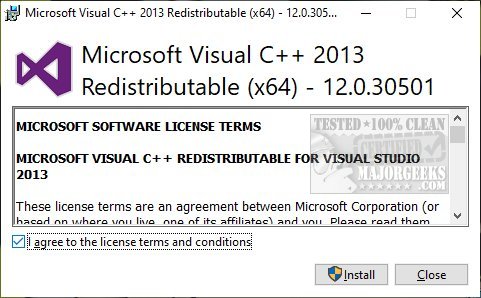
We tested fixing this error using other runtimes including the Microsoft Visual C++ 2015-2019 Redistributable Package, which is supposed to wrap all of the runtimes in one download. But, only by installing the Microsoft Visual C++ 2013 Redistributable were we able to run our game.
comments powered by Disqus
Visual C++ Libraries (or runtimes) are the end-user files for any program, app, or game written in Visual C++. The end-user, of course, has no idea what language a program is written in or that they need the runtimes. This only adds to the frustration with the MSVCP140.dll error.
Adding to the Visual C++ confusion is that there are numerous versions named by year going back to 2005.
Often we recommend the latest official Microsoft Visual C++ Runtimes, but not for this error. Every so often, you need just the right runtimes, and this is one of those times.
The Vcomp120.Dll is missing error can be fixed by installing the Microsoft Visual C++ 2013 Redistributable.
We tested fixing this error using other runtimes including the Microsoft Visual C++ 2015-2019 Redistributable Package, which is supposed to wrap all of the runtimes in one download. But, only by installing the Microsoft Visual C++ 2013 Redistributable were we able to run our game.
comments powered by Disqus
