


What Is a wab.exe File?
By Timothy Tibbettson 06/15/2023 |
You may have noticed a file called wab.exe on your computer and wondered what it was. wab.exe is part of your Windows Contacts, People, Outlook, and more and is referred to as the Windows Address Book.
Is wab.exe Legit?
A lot of websites in the business of scaring people will tell you that wab.exe is malware. Not exactly. Malware is a possibility if wab.exe was found anywhere but C:\Program Files\Windows Mail, C:\Program Files (x86)\Windows Mail or C:\Windows\WinSxS folders. You might find as many as eight locations.
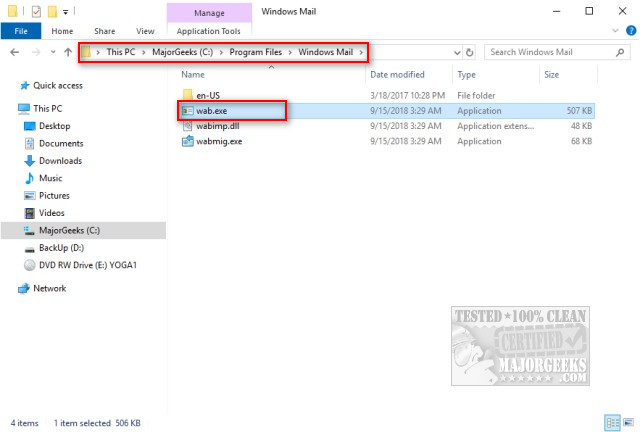
You can verify the location by pressing CTRL + Shift + Esc and click on the Details tab in Windows 10 (Services tab on Windows 7) and right-click the on wab.exe process and select Open file location.
If wab.exe is located anywhere but C:\Program Files\Windows Mail, C:\Program Files (x86)\Windows Mail or C:\Windows\WinSxS folders, then odds are it is malware, and you'll want to remove it.
wab.exe Consuming High CPU
One other issue that might have led you to discover wab.exe is high CPU usage. You could reboot, or kill the process and let it restart and you should be fine.
That said, if you're going to reboot anyway, then we want to reregister the DLL first and accomplish two fixes in one.
Press the Windows Key + R and type in regsvr32 WABSyncProvider.dll and reboot.
comments powered by Disqus
Is wab.exe Legit?
A lot of websites in the business of scaring people will tell you that wab.exe is malware. Not exactly. Malware is a possibility if wab.exe was found anywhere but C:\Program Files\Windows Mail, C:\Program Files (x86)\Windows Mail or C:\Windows\WinSxS folders. You might find as many as eight locations.
You can verify the location by pressing CTRL + Shift + Esc and click on the Details tab in Windows 10 (Services tab on Windows 7) and right-click the on wab.exe process and select Open file location.
If wab.exe is located anywhere but C:\Program Files\Windows Mail, C:\Program Files (x86)\Windows Mail or C:\Windows\WinSxS folders, then odds are it is malware, and you'll want to remove it.
wab.exe Consuming High CPU
One other issue that might have led you to discover wab.exe is high CPU usage. You could reboot, or kill the process and let it restart and you should be fine.
That said, if you're going to reboot anyway, then we want to reregister the DLL first and accomplish two fixes in one.
Press the Windows Key + R and type in regsvr32 WABSyncProvider.dll and reboot.
comments powered by Disqus
