


What's Your System Type?
By selma čitakovićon 06/06/2026 |
![{$insert['content_title']](/content/file/6063_image3.png
)
Want to install something, but you're unsure whether to get the 32-bit, 64-bit, or ARM version? First, you'll need to know your system type for compatibility. This tells you your system's architecture, which is determined by your processor.
In modern Windows 11 systems, it's usually either 64-bit or ARM64. They can run both 32-bit and 64-bit applications, but generally, you should go for the version that matches your system type. On the other hand, older machines with a 32-bit CPU are limited to 32-bit software and can't run 64-bit or ARM64 apps.
Here's how to find out which one is yours!
Via Settings
You can check it right here:
- Go to Settings > System > About. You'll have to scroll all the way down to find it.
- Look for System type under Device info/Device specifications.
- So, if it says "64-bit operating system, x64-based processor", it's 64-bit. On the other hand, if it's a 64-bit operating system, ARM-based processor, it's ARM64.
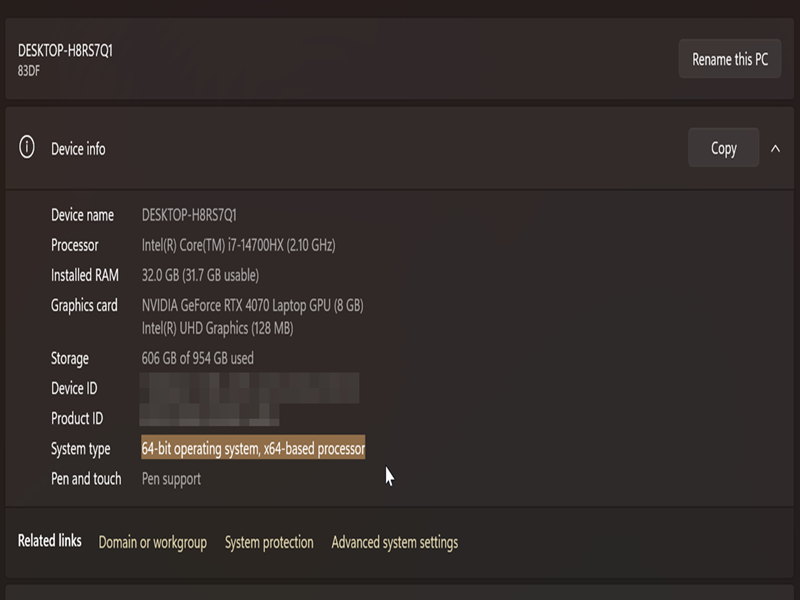
The steps here apply to both Windows 10 and 11.
Via msinfo32
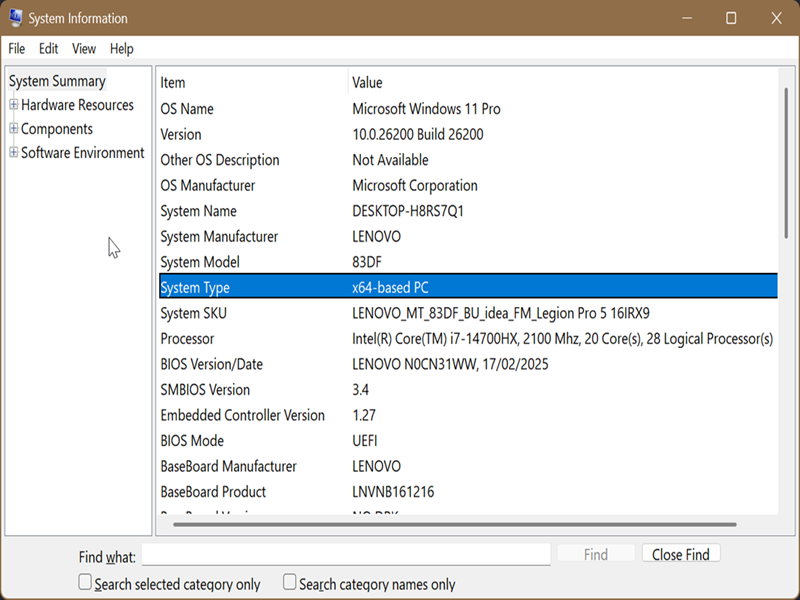
System Information (msinfo32.exe) is a built-in tool that provides an overview of your hardware, software environment, and system components. To use it:
- Press Win + R, type msinfo32, and hit Enter.
- Click on System Summary on the left.
- Look for System Type on the right side. For example: x64-based PC (64-bit) or ARM64-based PC (ARM64).
Via Command
Finally, you can look up this information in the terminal. Here's how:
- Press Win + X, select Terminal, and open either Command Prompt or PowerShell.
- Type the following command and press Enter: systeminfo | findstr /C:"System Type"
- It will display your system type.
Alternatively, you can try this one:
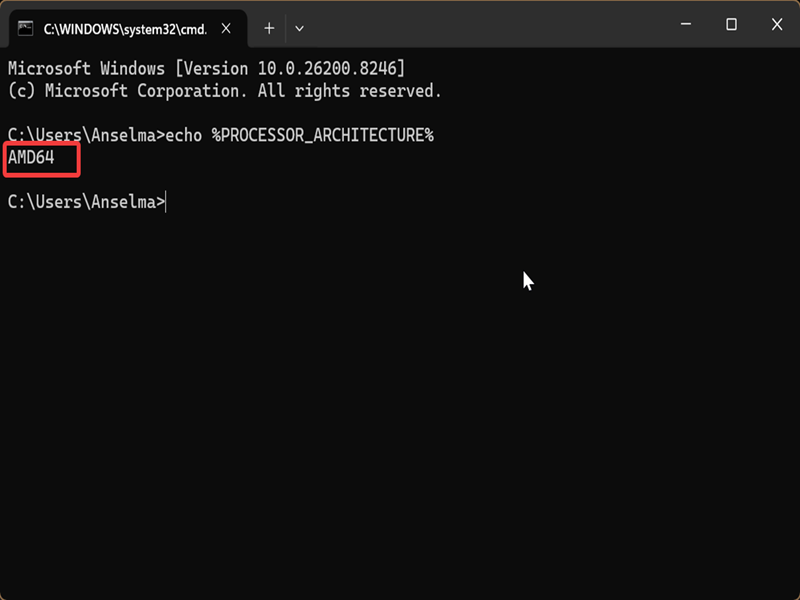
- Press Win + R, type cmd, and hit Enter.
- Paste this command and press Enter: echo %PROCESSOR_ARCHITECTURE%
- It will show AMD64 (64-bit), ARM64, or x86 (32-bit) if it's an older device.
Now that you know your system type, there shouldn't be any confusion about which apps to get.

|
selma citakovic
Selma is a gamer, geek and gremlin hunter with a passion for cyber security and smashing Windows bugs before they bite. She’s IBM-certified, loves real freeware, despises bloatware, and powers most of her troubleshooting with an unhealthy amount of coffee. |
comments powered by Disqus
