


Windows 10 Full Screen Games Are Distorted or Scrambled
By Timothy Tibbettson 06/20/2023 |
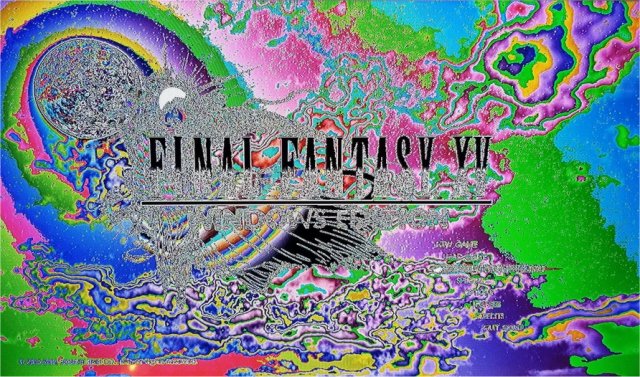
Are your full-screen games appearing blurry, or with numerous colors? Some might call it a rainbow or acid trip. Regardless, it's ruining game time and easy to fix.
1: Update Your Display Drivers
Tech support 101 is always to update your display drivers. Never allow Windows Updates to do so, because they are always a basic, out of date driver. Intel, AMD, and NVIDIA make updating your drivers easy. You could also use Driver Booster to update everything.
2: Change Your Display to 8-Bit Color Depth
Changing your display color depth varies from operating system to video card. Check under Control Panel > Display Settings > Output Color Depth and change it to 8 Bit Color Depth. If you can't find that, find the control panel for your display drivers and look for change screen resolution. Again, this can vary depending on whether you have AMD, NVIDIA, or Intel.
3: Lower Your Refresh Rate to 59Hz
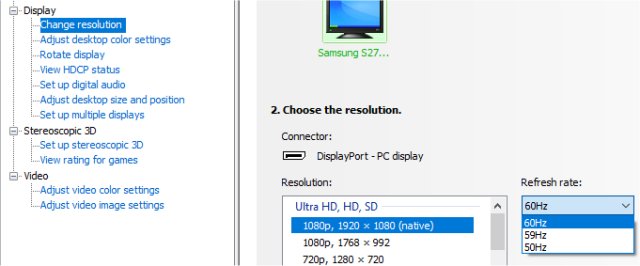
Again, this varies depending on your operating system, video card, or if you have the monitor drivers installed so that your monitor is recognized properly. We prefer to do this in your display driver control panel. For example, NVIDIA control panel can be found under Control Panel > Appearance and Personalization > NVIDIA Control Panel. Go to Display, Change Resolution and change the Refresh Rate from 60Hz to 59Hz.
comments powered by Disqus
1: Update Your Display Drivers
Tech support 101 is always to update your display drivers. Never allow Windows Updates to do so, because they are always a basic, out of date driver. Intel, AMD, and NVIDIA make updating your drivers easy. You could also use Driver Booster to update everything.
2: Change Your Display to 8-Bit Color Depth
Changing your display color depth varies from operating system to video card. Check under Control Panel > Display Settings > Output Color Depth and change it to 8 Bit Color Depth. If you can't find that, find the control panel for your display drivers and look for change screen resolution. Again, this can vary depending on whether you have AMD, NVIDIA, or Intel.
3: Lower Your Refresh Rate to 59Hz
Again, this varies depending on your operating system, video card, or if you have the monitor drivers installed so that your monitor is recognized properly. We prefer to do this in your display driver control panel. For example, NVIDIA control panel can be found under Control Panel > Appearance and Personalization > NVIDIA Control Panel. Go to Display, Change Resolution and change the Refresh Rate from 60Hz to 59Hz.
comments powered by Disqus
