


Windows Can't Activate - Try Again Later - Error Code 0xC004F034
By Timothy Tibbettson 06/19/2023 |
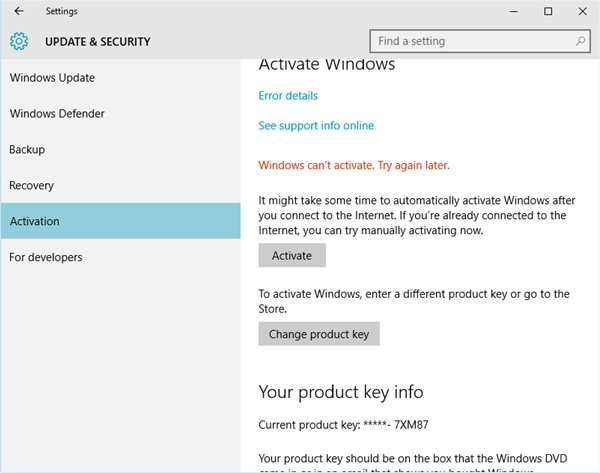
There's a known error in Windows that appears as Windows Can't Activate. Try Again Later. Error Code 0xC004F034 and the cause is due to a change in the activation process by Microsoft affecting specific Windows installations. It should be easy to fix. Here's how.
Run the Activation Troubleshooter
Click on Start, Settings, Update & security, Activation, and select Troubleshoot. That should fix most of the activation problems causing error code 0xC004F034. If you don't see the Troubleshoot option, then windows thinks your computer is activated. Rebooting at this point may help and repeat the above steps.
Call Microsoft Support for Phone Activation
If the troubleshooter didn't solve the problem, we're going to need a real person. Don't worry, calling Microsoft is easier than it sounds. At the time of this article, their phone number is 1-800-642-7676. Optionally, you can press the Windows Key + R, type in slui.exe 4 , hit enter and follow the prompts.
Whichever method works for you, error code 0xC004F034 is a known Windows validation error and hopefully, you're all set now.
Similar:
Do Cheap Windows 10 Keys Really Work?
8 Ways to Activate Windows 10
How to Activate After Reinstalling Windows 10
Will Windows 10 Receive Windows Updates if It's Not Activated?
Windows Keeps Asking to Activate Repeatedly
Can I Have Multiple Windows 10 or Microsoft Office Keys One One Account?
comments powered by Disqus
Run the Activation Troubleshooter
Click on Start, Settings, Update & security, Activation, and select Troubleshoot. That should fix most of the activation problems causing error code 0xC004F034. If you don't see the Troubleshoot option, then windows thinks your computer is activated. Rebooting at this point may help and repeat the above steps.
Call Microsoft Support for Phone Activation
If the troubleshooter didn't solve the problem, we're going to need a real person. Don't worry, calling Microsoft is easier than it sounds. At the time of this article, their phone number is 1-800-642-7676. Optionally, you can press the Windows Key + R, type in slui.exe 4 , hit enter and follow the prompts.
Whichever method works for you, error code 0xC004F034 is a known Windows validation error and hopefully, you're all set now.
Similar:
comments powered by Disqus
