


Emsisoft Decrypter for GetCrypt 1.0.0.0
|
Author:
Emsisoft
Date: 05/22/19 Size: 1.57 MB License: Freeware Requires: Win 10 / 8 / 7 / Vista / XP Downloads: 2648 times  TIP:
Click Here to Repair or
TIP:
Click Here to Repair orRestore Missing Windows Files |
 Download@Authors Site Download@MajorGeeks Download@MajorGeeks
|
MajorGeeks: Setting the standard for editor-tested, trusted, and secure downloads since 2002. |
 Avast Free Antivirus Worried about finance scams?
Get free antivirus with AI-powered online scam detection Download Free!
Emsisoft Decrypter for GetCrypt is designed for releasing files encrypted by the GetCrypt ransomware, so you do not have to pay the ransom.
GetCrypt is a strain of ransomware spread by the RIG exploit kit; it encrypts a victim's files using Salsa20 and RSA-4096. It appends a random 4-character extension to files that is unique to the targeted victim.
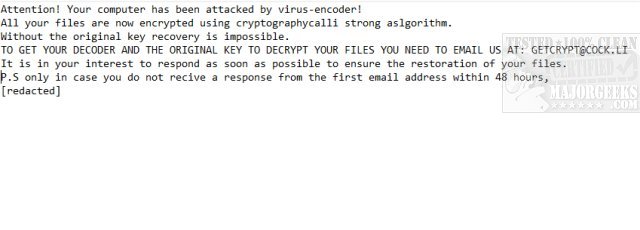
The ransom note is titled # DECRYPT MY FILES #.txt and features the following text.
You will need to remove the malware from your system first; otherwise, it will repeatedly lock your system or encrypt files. By default, Emsisoft Decrypter for GetCrypt will pre-populate the locations to decrypt with the currently connected drives and network drives. Additional locations can be added via the Add button.
Decrypters typically offer various options depending on the particular malware family. The available options are located in the Options tab and can be enabled or disabled there. After you have added all the locations you want to decrypt to the list, click the “Decrypt” button to start the decryption process. The screen will switch to a status view, informing you about the current process and decryption status of your files.
Emsisoft Decrypter for GetCrypt will inform you that the decryption process is complete. If you require a report for your records, you can save it by clicking the Save log button. You also have the option to copy it straight to your clipboard for use in emails, forum posts, etc., if needed.
GetCrypt is a strain of ransomware spread by the RIG exploit kit; it encrypts a victim's files using Salsa20 and RSA-4096. It appends a random 4-character extension to files that is unique to the targeted victim.
The ransom note is titled # DECRYPT MY FILES #.txt and features the following text.
You will need to remove the malware from your system first; otherwise, it will repeatedly lock your system or encrypt files. By default, Emsisoft Decrypter for GetCrypt will pre-populate the locations to decrypt with the currently connected drives and network drives. Additional locations can be added via the Add button.
Decrypters typically offer various options depending on the particular malware family. The available options are located in the Options tab and can be enabled or disabled there. After you have added all the locations you want to decrypt to the list, click the “Decrypt” button to start the decryption process. The screen will switch to a status view, informing you about the current process and decryption status of your files.
Emsisoft Decrypter for GetCrypt will inform you that the decryption process is complete. If you require a report for your records, you can save it by clicking the Save log button. You also have the option to copy it straight to your clipboard for use in emails, forum posts, etc., if needed.
 Screenshot for Emsisoft Decrypter for GetCrypt
Top Downloads In Ransomware Removal
 Bitdefender Anti-Ransomware 1.0.12.151 [ 2017-04-24 10:12:30 | 4.55 MB | Freeware | 11 | 5 ] Avast Ransomware Decryption Tools 1.0.0.838 [ 2026-07-01 10:22:06 | 107 MB | Freeware | 11|10|8|7 | 5 ] Malwarebytes Anti-Ransomware 0.9.20 Beta 11 [ 2022-04-15 05:46:32 | 2 MB | Freeware | 11|10|8|7 | 5 ] STOPDecrypter 2.1.0.18 [ 2019-07-21 06:14:47 | 2.35 MB | Freeware | Win 10 / 8 / 7 / Vista / XP | 5 ] Emsisoft Decryptor Tools [ 2022-07-05 15:01:42 | 99 MB | Freeware | 11|10|8|7 | 5 ]
 Tactical Briefings
Comment Rules & Etiquette - We welcome all comments from our readers, but any comment section requires some moderation. Some posts are auto-moderated to reduce spam, including links and swear words. When you make a post, and it does not appear, it went into moderation. We are emailed when posts are marked as spam and respond ASAP. Some posts might be deleted to reduce clutter. Examples include religion, politics, and comments about listing errors (after we fix the problem and upvote your comment). Finally, be nice. Thank you for choosing MajorGeeks.

© 2000-2026 MajorGeeks.com
Powered by Contentteller® CMS System