


MajorGeeks News and Software Updater 5.0
|
Author:
MajorGeeks.com
Date: 11/29/26 Size: 9 Mb License: Freeware Requires: 11|10|Linux Downloads: 172359 times  TIP:
Click Here to Repair or Restore Missing Windows Files |
 Download@MajorGeeks Download@MajorGeeks
|
MajorGeeks: Setting the standard for editor-tested, trusted, and secure downloads since 2002. |
 Avast Free Antivirus Worried about finance scams?
Get free antivirus with AI-powered online scam detection Download Free!
Hey, Geeks. Ever wonder what's new on MajorGeeks but feel too lazy to type the URL? We built this for you.
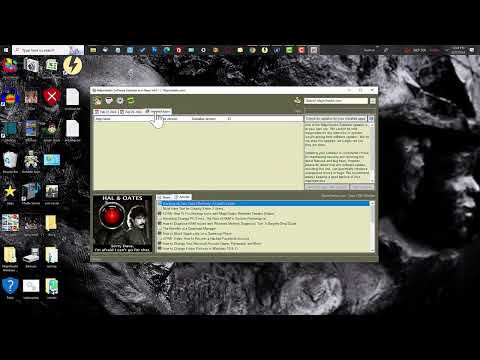
MajorGeeks News and Software Updater is a free desktop app that brings the latest MajorGeeks downloads, news, and articles to your desktop. It also checks the apps on your computer for available updates and lets you decide which ones to install. This is a portable app that runs on Windows or Linux.
The Today and Yesterday tabs show every new or updated file we posted on those dates. Click a title to read the full description, or double-click it to open the download page on MajorGeeks. Turn on version numbers in Settings if you like to see which release we posted right next to the filename.
Looking for something specific? Type a keyword to narrow the list, or use the platform filter to see downloads for Windows, Linux, macOS, or Android. If what you need is older than yesterday, the built-in search opens a full MajorGeeks site search in your browser.
You'll also find our latest news, how-to articles, Off Base, and Way Off Base stories. The Picture of the Day gets its own spot in the sidebar, caption and all. And yes, our news is unmissable. Just ask us.
Open the Installed Apps tab and click Check for Updates. The updater uses winget on Windows and Flatpak on Linux to list the apps they recognize and highlight any with a newer version available. Hover over an entry to see its full name, app ID, installed version, and available version.
Double-click an outdated app to update it, or update everything at once and follow the progress in the live log. Pro tip: Coverage depends on what winget or Flatpak can identify on your computer, so some programs may still need to be updated separately.
Why bother when plenty of programs already update themselves? Well, most still leave that job to you. Also, we hate automatic updates. Quite often there may be an update you'd prefer to skip, like when a favorite freeware tool that's just gone payware. Or, either you dont have time to deal with a bunch of reboots, so you'd rather do them all at once.
Here you can grab the fixes you want and leave that one alone.
In Settings, enter a few keywords separated by commas, such as Firefox, 7-Zip, VLC. When a matching file shows up in today's list, the updater can highlight it in red, pop up an alert, or do both. That's handy if you're waiting for a particular release and don't want to check the site every day.
You can refresh manually or set your own refresh interval. Set it to zero to turn automatic refresh off. If you'd rather keep the window out of the way, you can start it minimized, send it to the system tray when you close it, or have it launch when you sign in to Windows. Right-click the tray icon to bring it back or refresh the site content or installed apps. Launching the program again brings the existing window forward.
Heres how it works:
This one's a MAJOR update. (See what we did there?...MAJOR. ) We rewrote the original app in Rust, added Linux support, and gave the interface a fresh look while keeping the familiar layout.
● More reliable Windows update checks. The old updater read winget's output using fixed character positions. When the columns shifted, names got cut off, versions ended up in the wrong place, and you could see "0 updates" even when updates were waiting. Version 5.0 reads winget's actual column layout.
● Better refresh errors. If MajorGeeks.com can't be reached, the updater keeps the content already on screen and tells you what went wrong, such as a connection failure, an HTTP error, or a firewall or Cloudflare block. That's a little more helpful than "No content shown?"
● More room and four color choices. The Installed Apps list has a wider name column. Choose the classic MajorGeeks colors or a neutral palette, each available in light and dark. A toolbar button lets you switch between light and dark with one click.
● Your settings carry over. On Windows, settings now live in %APPDATA%\MajorGeeks\MajorGeeksUpdates. The first time you run version 5.0, it brings your old settings over automatically.
We originally built this app with our friends at Alomware. Check out their stuff. It's great. We're still working on the updater, so if there's a feature you'd like to see, let us know in the comments below.
This program is a work in progress, so if you have a feature - please leave it in the comments below.
MajorGeeks News and Software Updater is a free desktop app that brings the latest MajorGeeks downloads, news, and articles to your desktop. It also checks the apps on your computer for available updates and lets you decide which ones to install. This is a portable app that runs on Windows or Linux.
See what's new on MajorGeeks
The Today and Yesterday tabs show every new or updated file we posted on those dates. Click a title to read the full description, or double-click it to open the download page on MajorGeeks. Turn on version numbers in Settings if you like to see which release we posted right next to the filename.
Looking for something specific? Type a keyword to narrow the list, or use the platform filter to see downloads for Windows, Linux, macOS, or Android. If what you need is older than yesterday, the built-in search opens a full MajorGeeks site search in your browser.
You'll also find our latest news, how-to articles, Off Base, and Way Off Base stories. The Picture of the Day gets its own spot in the sidebar, caption and all. And yes, our news is unmissable. Just ask us.
Check your installed apps for updates
Open the Installed Apps tab and click Check for Updates. The updater uses winget on Windows and Flatpak on Linux to list the apps they recognize and highlight any with a newer version available. Hover over an entry to see its full name, app ID, installed version, and available version.
Double-click an outdated app to update it, or update everything at once and follow the progress in the live log. Pro tip: Coverage depends on what winget or Flatpak can identify on your computer, so some programs may still need to be updated separately.
Why bother when plenty of programs already update themselves? Well, most still leave that job to you. Also, we hate automatic updates. Quite often there may be an update you'd prefer to skip, like when a favorite freeware tool that's just gone payware. Or, either you dont have time to deal with a bunch of reboots, so you'd rather do them all at once.
Here you can grab the fixes you want and leave that one alone.
Get a heads-up when your favorite software changes
In Settings, enter a few keywords separated by commas, such as Firefox, 7-Zip, VLC. When a matching file shows up in today's list, the updater can highlight it in red, pop up an alert, or do both. That's handy if you're waiting for a particular release and don't want to check the site every day.
You can refresh manually or set your own refresh interval. Set it to zero to turn automatic refresh off. If you'd rather keep the window out of the way, you can start it minimized, send it to the system tray when you close it, or have it launch when you sign in to Windows. Right-click the tray icon to bring it back or refresh the site content or installed apps. Launching the program again brings the existing window forward.
Heres how it works:
▶
What's new in version 5.0
This one's a MAJOR update. (See what we did there?...MAJOR.
) We rewrote the original app in Rust, added Linux support, and gave the interface a fresh look while keeping the familiar layout.● More reliable Windows update checks. The old updater read winget's output using fixed character positions. When the columns shifted, names got cut off, versions ended up in the wrong place, and you could see "0 updates" even when updates were waiting. Version 5.0 reads winget's actual column layout.
● Better refresh errors. If MajorGeeks.com can't be reached, the updater keeps the content already on screen and tells you what went wrong, such as a connection failure, an HTTP error, or a firewall or Cloudflare block. That's a little more helpful than "No content shown?"
● More room and four color choices. The Installed Apps list has a wider name column. Choose the classic MajorGeeks colors or a neutral palette, each available in light and dark. A toolbar button lets you switch between light and dark with one click.
● Your settings carry over. On Windows, settings now live in %APPDATA%\MajorGeeks\MajorGeeksUpdates. The first time you run version 5.0, it brings your old settings over automatically.
We originally built this app with our friends at Alomware. Check out their stuff. It's great. We're still working on the updater, so if there's a feature you'd like to see, let us know in the comments below.
This program is a work in progress, so if you have a feature - please leave it in the comments below.
Editor's Note:
Got a "generic hit with AVAST on this release though Virus total showed clean. We summitted the false positive report should clear soon, but could be a day or two.
 Screenshot for MajorGeeks News and Software Updater
Top Downloads In MajorGeeks Windows Tweaks
 Microsoft Edge Blocker Toolkit [ 2019-12-18 21:02:00 | 174 KB | Freeware | 11 | 5 ] MajorGeeks News and Software Updater 5.0 [ 2026-11-29 10:19:44 | 9 Mb | Freeware | 11|10|Linux | 4 ] MajorGeeks Windows Tweaks 2.97 [ 2024-04-29 23:59:59 | 2 MB | Freeware | 11|10|8|7 | 5 ] Restore Windows Photo Viewer on Windows 10 & 11 [ 2021-12-02 16:47:55 | 4 KB | Freeware | 10 | 5 ] Take Full Ownership of Files & Folders Context Menu [ 2021-11-20 09:16:21 | 1 KB | Freeware | 11 | 5 ]
Tactical Briefings
Comment Rules & Etiquette - We welcome all comments from our readers, but any comment section requires some moderation. Some posts are auto-moderated to reduce spam, including links and swear words. When you make a post, and it does not appear, it went into moderation. We are emailed when posts are marked as spam and respond ASAP. Some posts might be deleted to reduce clutter. Examples include religion, politics, and comments about listing errors (after we fix the problem and upvote your comment). Finally, be nice. Thank you for choosing MajorGeeks.

© 2000-2026 MajorGeeks.com
Powered by Contentteller® CMS System