


MajorGeeks News and Software Updater 4.0.2.2
|
Author:
MajorGeeks.com
Date: 05/23/25 Size: 668 KB License: Freeware Requires: 11|10 Downloads: 171735 times  TIP:
Click Here to Repair or
TIP:
Click Here to Repair orRestore Missing Windows Files |
 Download@MajorGeeks Download@MajorGeeks
|
MajorGeeks: Setting the standard for editor-tested, trusted, and secure downloads since 2002. |
 Avast Free Antivirus Worried about finance scams?
Get free antivirus with AI-powered online scam detection Download Free!
Hey Geeks - Ever find yourself looking for the latest in software but too lazy to type in the URL to MajorGeeks.com? We've solved that for you with our Software Updates and News Program. In a nutshell, we wrapped the website and its daily updates into a layout suitable for your desktop. Now, all the new files, updated files, News, Off Base, and Way Off Base topics are just a click away—no need for messy typing.
News Update Function
The Update function sits in your systray (next to your clock) and can notify you of any new files or articles on MajorGeeks.com without searching the site. Click the icon when you are ready to see new topics. If you want updates, hit the refresh button or set monitoring to automatic. The tabbed interface will show multiple days' worth of news. You can easily see whether the program is Windows, Linux, Mac, Android or all, or set up a filter to only see the types of software you are interested in. The layout is designed to be able to glance at titles and descriptions quickly, or you can filter and sort as needed.
Software Update Function
Further, by checking out the "Installed" apps tab and clicking check for updates, the app will scan your drive for any out-of-date software, highlight the out-of-date items, and allow you to install the update just by double-clicking. Easy. You can choose to select one at a time or all at once, depending on your mood.
Why use the News and SoftwareUpdater?
Many programs have automatic updating built in, but many still need to, and keeping up with the current version can leave your system vulnerable. Keeping current, at minimum, allows you to have the newest, coolest features or security fixes when needed. Also, sometimes you do not want an update, like when something goes from freeware to payware. Using the MajorGeeks News and Software Updater can take some of the work out of the update process and give you more choices.
Also, our news is simply unmissable. Just ask us.
We at MajorGeeks worked closely with our friends at Alomware to develop a small, portable app quickly display the information you most want and access that information with a simple click. The only way it could be easier is if we showed up and did it for you --- but until teleporters are real, we suggest you go with the updater.
Make sure you check out the settings tab, where you can select several settings, including refresh rate, start-up options, and color scheme.
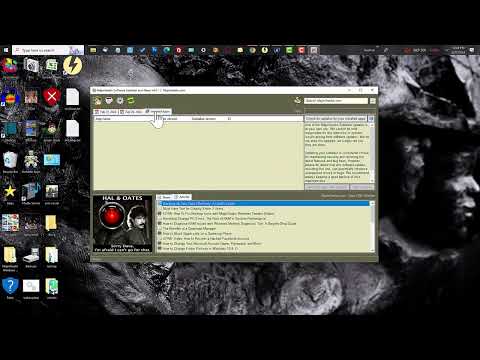
This program is a work in progress, so if you have a feature - please leave it in the comments below.
News Update Function
The Update function sits in your systray (next to your clock) and can notify you of any new files or articles on MajorGeeks.com without searching the site. Click the icon when you are ready to see new topics. If you want updates, hit the refresh button or set monitoring to automatic. The tabbed interface will show multiple days' worth of news. You can easily see whether the program is Windows, Linux, Mac, Android or all, or set up a filter to only see the types of software you are interested in. The layout is designed to be able to glance at titles and descriptions quickly, or you can filter and sort as needed.
Software Update Function
Further, by checking out the "Installed" apps tab and clicking check for updates, the app will scan your drive for any out-of-date software, highlight the out-of-date items, and allow you to install the update just by double-clicking. Easy. You can choose to select one at a time or all at once, depending on your mood.
Why use the News and SoftwareUpdater?
Many programs have automatic updating built in, but many still need to, and keeping up with the current version can leave your system vulnerable. Keeping current, at minimum, allows you to have the newest, coolest features or security fixes when needed. Also, sometimes you do not want an update, like when something goes from freeware to payware. Using the MajorGeeks News and Software Updater can take some of the work out of the update process and give you more choices.
Also, our news is simply unmissable. Just ask us.
We at MajorGeeks worked closely with our friends at Alomware to develop a small, portable app quickly display the information you most want and access that information with a simple click. The only way it could be easier is if we showed up and did it for you --- but until teleporters are real, we suggest you go with the updater.
Make sure you check out the settings tab, where you can select several settings, including refresh rate, start-up options, and color scheme.
▶
This program is a work in progress, so if you have a feature - please leave it in the comments below.
Version History for MajorGeeks News and Software Updater:
4.0.2.2
Updated Icons to display correctly
Added WebApplication icons
Interface Update
4.0.2.1
Bug fix: When pressing F11 to toggle the window's maximization.
Bug fix: Sometimes, the picture wouldn't load at startup until the app had an auto or manual refresh.
Maintenance: Other miscellaneous internal bug and stability fixes and code optimizations.
4.0.2.0
Bug fix: App updates weren't formatting correctly on Win 11.
Bug fix: Messages no longer stay on top when you switch to another app.
Addition: A new "Deals" tab that links to great offers on MajorGeeks.com!
Editor's Note:
You will likely get a warning if you are using Windows Defender that this is an unknown app - mainly because to them, it is. if you have any concerns, here's the Virus Total Report
 Screenshot for MajorGeeks News and Software Updater
Top Downloads In MajorGeeks Windows Tweaks
 Microsoft Edge Blocker Toolkit [ 2019-12-18 21:02:00 | 174 KB | Freeware | 11 | 5 ] MajorGeeks News and Software Updater 4.0.2.2 [ 2025-05-23 08:32:33 | 668 KB | Freeware | 11|10 | 4 ] MajorGeeks Windows Tweaks 2.97 [ 2024-04-29 23:59:59 | 2 MB | Freeware | 11|10|8|7 | 5 ] Restore Windows Photo Viewer on Windows 10 & 11 [ 2021-12-02 16:47:55 | 4 KB | Freeware | 10 | 5 ] Take Full Ownership of Files & Folders Context Menu [ 2021-11-20 09:16:21 | 1 KB | Freeware | 11 | 5 ]
 Tactical Briefings
Comment Rules & Etiquette - We welcome all comments from our readers, but any comment section requires some moderation. Some posts are auto-moderated to reduce spam, including links and swear words. When you make a post, and it does not appear, it went into moderation. We are emailed when posts are marked as spam and respond ASAP. Some posts might be deleted to reduce clutter. Examples include religion, politics, and comments about listing errors (after we fix the problem and upvote your comment). Finally, be nice. Thank you for choosing MajorGeeks.

© 2000-2026 MajorGeeks.com
Powered by Contentteller® CMS System