


PDFGeek
1.1.1 
|
Author:
TechyGeeksHome
Date: 08/30/26 Size: 44 MB License: Freeware Requires: 11|10 Downloads: 1233 times  TIP:
Click Here to Repair or
TIP:
Click Here to Repair orRestore Missing Windows Files |
Download (EXE) Download (Portable) Download@MajorGeeks Download@MajorGeeks
|
MajorGeeks: Setting the standard for editor-tested, trusted, and secure downloads since 2002. |
 Avast Free Antivirus Worried about finance scams?
Get free antivirus with AI-powered online scam detection Download Free!
PDFGeek is a free offline PDF toolkit designed specifically for Windows users. This software offers a comprehensive suite of features that help you manage PDF documents efficiently.
With PDFGeek, you have a powerful tool at your fingertips for seamless PDF management, letting you merge multiple PDF files into a single cohesive document in just a few clicks. This feature is especially useful for professionals handling numerous reports or presentations, as it enables streamlined sharing and easier navigation. Conversely, if you have a large PDF that feels unwieldy, PDFGeek lets you split it into smaller, more manageable sections, making it easier to share specific segments without overwhelming your audience.
In addition to merging and splitting, PDFGeek lets you extract specific pages from a document, so you can isolate important information without the clutter of surrounding pages. If you find any pages that are unnecessary or unwanted, you can easily remove them, ensuring your final document is clean and to the point.
To further enhance your document manipulation capabilities, PDFGeek includes functionality to rotate PDF pages. This helps correct any orientation issues that may arise when pages are scanned or created, ensuring your document is presented correctly. You also have the ability to reorder pages within a document effortlessly, giving you full control over the flow of information. For brand owners and creators, adding customizable watermarks for branding or copyright purposes is a breeze, allowing you to maintain visibility and recognition of your work.
Security is a priority for most of us these days, and PDFGeek has your back by offering advanced security features such as AES-128 password protection. This lets you safeguard sensitive information in your PDFs, adding an extra layer of protection against unauthorized access. Whether you need to add or remove this protection, PDFGeek makes it easy to keep your confidential data secure.
PDFGeek Features:
● Merging PDF: Combine multiple PDF files into a single document in any desired order. You can easily drag and drop files into the interface, rearranging them as needed without any restrictions on the number of files.
● Splitting PDFs: Break a document down into separate files based on individual pages or fixed-sized chunks, allowing for customized output. You can choose a folder for the resulting files, which are named systematically for easy identification.
● Extracting or Removing Pages: Isolate specific pages from a PDF to create a new file, or exclude unwanted pages to keep only the necessary content. This feature works like print dialog options, where users can specify page ranges such as 1-3, 5, or 9.
● Rotating Pages: Adjust the orientation of pages in a document by 90°, 180°, or 270°. You can apply this to the entire document or to specific pages, with rotations building on each other for cumulative effects.
● Reordering a Document: Rearrange the pages of a PDF easily by listing the desired order. Pages not included in the new list will be omitted, which also lets you quickly trim the document.
● Watermarking: Apply a watermark to every page of a document, such as "DRAFT" or "CONFIDENTIAL." You can control the font size, opacity, and placement, allowing customization to suit your needs.
● AES-128 Password Protection: Secure PDF documents with a password, giving you the option to allow or restrict printing and text copying. The encryption is compatible with Adobe Acrobat 7 and later versions.
● Removing Passwords: Users can remove password protection from documents they can already access by entering the current password. This feature is designed for legitimate use and does not bypass digital rights management (DRM).
● Opening and Drag-and-Drop Functionality: PDFs can be opened directly with PDFGeek via right-clicking and selecting "Open with PDFGeek," or users can simply drag and drop files into the application. This opens files ready for editing, improving efficiency.
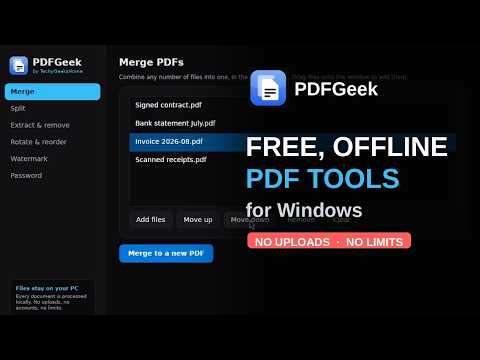
One of PDFGeek's standout features is its unwavering commitment to user privacy. Unlike many online tools that require you to upload your files to the cloud, all operations with PDFGeek are performed locally on your device. This means your documents stay on your hardware, reducing concerns about data privacy breaches and avoiding constraints typical of online PDF tools, such as file size limits. Overall, PDFGeek stands out as a comprehensive, secure, and user-friendly option for all your PDF management needs.
PDFGeek offers an array of tools designed to enhance the usability and management of your PDF documents, making it the ideal solution for anyone seeking to streamline their PDF workflow. Overall, PDFGeek provides an effective and user-friendly solution for all your PDF editing needs. And the fact that it's free doesn't hurt either!
Similar:
● How to Stop Microsoft Edge From Opening PDF and HTML Files
What is PDFGeek Developed to Do?
With PDFGeek, you have a powerful tool at your fingertips for seamless PDF management, letting you merge multiple PDF files into a single cohesive document in just a few clicks. This feature is especially useful for professionals handling numerous reports or presentations, as it enables streamlined sharing and easier navigation. Conversely, if you have a large PDF that feels unwieldy, PDFGeek lets you split it into smaller, more manageable sections, making it easier to share specific segments without overwhelming your audience.
In addition to merging and splitting, PDFGeek lets you extract specific pages from a document, so you can isolate important information without the clutter of surrounding pages. If you find any pages that are unnecessary or unwanted, you can easily remove them, ensuring your final document is clean and to the point.
Rotate PDFs
To further enhance your document manipulation capabilities, PDFGeek includes functionality to rotate PDF pages. This helps correct any orientation issues that may arise when pages are scanned or created, ensuring your document is presented correctly. You also have the ability to reorder pages within a document effortlessly, giving you full control over the flow of information. For brand owners and creators, adding customizable watermarks for branding or copyright purposes is a breeze, allowing you to maintain visibility and recognition of your work.
Secure Your PDF Document with a Password
Security is a priority for most of us these days, and PDFGeek has your back by offering advanced security features such as AES-128 password protection. This lets you safeguard sensitive information in your PDFs, adding an extra layer of protection against unauthorized access. Whether you need to add or remove this protection, PDFGeek makes it easy to keep your confidential data secure.
PDFGeek Features:
● Merging PDF: Combine multiple PDF files into a single document in any desired order. You can easily drag and drop files into the interface, rearranging them as needed without any restrictions on the number of files.
● Splitting PDFs: Break a document down into separate files based on individual pages or fixed-sized chunks, allowing for customized output. You can choose a folder for the resulting files, which are named systematically for easy identification.
● Extracting or Removing Pages: Isolate specific pages from a PDF to create a new file, or exclude unwanted pages to keep only the necessary content. This feature works like print dialog options, where users can specify page ranges such as 1-3, 5, or 9.
● Rotating Pages: Adjust the orientation of pages in a document by 90°, 180°, or 270°. You can apply this to the entire document or to specific pages, with rotations building on each other for cumulative effects.
● Reordering a Document: Rearrange the pages of a PDF easily by listing the desired order. Pages not included in the new list will be omitted, which also lets you quickly trim the document.
● Watermarking: Apply a watermark to every page of a document, such as "DRAFT" or "CONFIDENTIAL." You can control the font size, opacity, and placement, allowing customization to suit your needs.
● AES-128 Password Protection: Secure PDF documents with a password, giving you the option to allow or restrict printing and text copying. The encryption is compatible with Adobe Acrobat 7 and later versions.
● Removing Passwords: Users can remove password protection from documents they can already access by entering the current password. This feature is designed for legitimate use and does not bypass digital rights management (DRM).
● Opening and Drag-and-Drop Functionality: PDFs can be opened directly with PDFGeek via right-clicking and selecting "Open with PDFGeek," or users can simply drag and drop files into the application. This opens files ready for editing, improving efficiency.
▶
Runs Locally, Nothing to the Cloud
One of PDFGeek's standout features is its unwavering commitment to user privacy. Unlike many online tools that require you to upload your files to the cloud, all operations with PDFGeek are performed locally on your device. This means your documents stay on your hardware, reducing concerns about data privacy breaches and avoiding constraints typical of online PDF tools, such as file size limits. Overall, PDFGeek stands out as a comprehensive, secure, and user-friendly option for all your PDF management needs.
Geek Verdict
PDFGeek offers an array of tools designed to enhance the usability and management of your PDF documents, making it the ideal solution for anyone seeking to streamline their PDF workflow. Overall, PDFGeek provides an effective and user-friendly solution for all your PDF editing needs. And the fact that it's free doesn't hurt either!
Similar:
● How to Stop Microsoft Edge From Opening PDF and HTML Files
 Screenshot for PDFGeek
Top Downloads In PDF Readers, Editors, Writers
 Adobe Acrobat Reader DC 26.002.21901 [ 2026-09-08 03:36:10 | Size Varies | Ad-Supported | 11|10|8|7|macOS | 4 ] Foxit PDF Reader 2026.2.1.39815 [ 2026-09-23 02:32:53 | Size Varies | Shareware | 11|10|8|7|Linux|macOS | 4 ] PDF24 Creator 11.30.1 [ 2026-04-21 09:03:24 | 408-480 MB | Freemium | 11|10|WebApp | 4 ] Icecream PDF Converter 2.89 [ 2021-11-02 09:54:03 | 126 MB | Freemium | 11|10|8|7 | 4 ] Icecream PDF Split&Merge 3.47 [ 2023-04-25 10:53:44 | 19 MB | Freemium | 11|10|8|7 | 4 ]
 Tactical Briefings
Comment Rules & Etiquette - We welcome all comments from our readers, but any comment section requires some moderation. Some posts are auto-moderated to reduce spam, including links and swear words. When you make a post, and it does not appear, it went into moderation. We are emailed when posts are marked as spam and respond ASAP. Some posts might be deleted to reduce clutter. Examples include religion, politics, and comments about listing errors (after we fix the problem and upvote your comment). Finally, be nice. Thank you for choosing MajorGeeks.

© 2000-2026 MajorGeeks.com
Powered by Contentteller® CMS System