


Win STORM 1.0.1.10 Beta
|
Author:
Carifred
Date: 09/20/26 Size: 31 MB License: Subscription $50.00 Year+ Requires: 11|10|8|7 Downloads: 1632 times  TIP:
Click Here to Repair or
TIP:
Click Here to Repair orRestore Missing Windows Files |
Download (EXE) Download (Portable)
|
MajorGeeks: Setting the standard for editor-tested, trusted, and secure downloads since 2002. |
 Avast Free Antivirus Worried about finance scams?
Get free antivirus with AI-powered online scam detection Download Free!
Win STORM is a comprehensive, professional tool specifically designed to supervise, tweak, optimize, repair, and maintain Windows-based systems. Tailored for the needs of computer technicians and IT professionals, this robust application equips users with an extensive suite of features essential for efficient computer management.
Win STORM is an advanced software solution developed based on the robust framework of UVK – Ultra Virus Killer. It not only retains all the features of UVK but also introduces additional functionalities that enhance its performance and capabilities.
With Win STORM, you can easily monitor system performance, make necessary adjustments to improve speed and efficiency, and perform thorough repairs when issues arise. The tool also supports remote access, enabling technicians to assist clients from anywhere and streamlining the support process.
The intuitive user interface ensures that professionals can navigate through its robust features effortlessly, while detailed reporting tools provide valuable insights into system health and performance history. Overall, Win STORM stands out as an essential resource for those dedicated to maintaining optimal computing environments.
Win STORM features an application dashboard that provides comprehensive insights into the computer's hardware and software configuration. Users can view detailed information about essential components, including the motherboard, processor, graphics card, available RAM, and the status of security measures such as antivirus software, Windows Firewall, User Account Control (UAC), and system restore points.
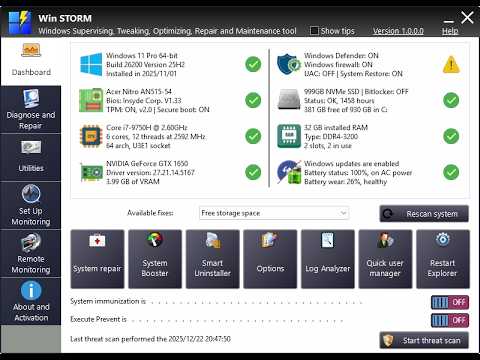
One of the key functionalities of Win STORM is its ability to automatically identify issues that could lead to software incompatibilities or performance slowdowns. For instance, it can detect the presence of multiple antivirus programs and recommend uninstalling them. With a single click, you can also free up storage space by removing temporary files, browser cache, error reports, and other unnecessary data accumulated by the system. Additionally, Win STORM includes an integrated Windows Update Manager (WAU Manager) to facilitate the process of finding and applying Windows updates.
Win STORM supports on-demand scanning, allowing for a more in-depth analysis that can uncover malware, unwanted files, autostart entries, DNS hijacking traces, residual files from uninstalled applications, and malfunctioning device drivers.
Moreover, Win STORM offers a wide range of customization options for Windows. Users can tweak visual elements such as taskbar thumbnails, transparency effects, and Aero Peek, and explore different menu styles. Productivity enhancements are also available, such as disabling Cortana and Windows Search, removing the lock screen, and managing user telemetry settings.
Win STORM allows adjustments such as disabling UAC, potentially unwanted program (PUP) detection, automatic updates, Windows Defender, the Windows Firewall, and OneDrive. It is important to note that applying certain changes may necessitate a system restart.
Win STORM brings multiple system maintenance and optimization tools together into a single command center, providing an all-in-one utility to help diagnose and safeguard the PC. Moreover, it provides local and remote PC monitoring to meet the needs of system and network administrators.
What is Win STORM
Win STORM is an advanced software solution developed based on the robust framework of UVK – Ultra Virus Killer. It not only retains all the features of UVK but also introduces additional functionalities that enhance its performance and capabilities.
What Does it Do?
With Win STORM, you can easily monitor system performance, make necessary adjustments to improve speed and efficiency, and perform thorough repairs when issues arise. The tool also supports remote access, enabling technicians to assist clients from anywhere and streamlining the support process.
Intuitive Interface Helps Get The Job Done
The intuitive user interface ensures that professionals can navigate through its robust features effortlessly, while detailed reporting tools provide valuable insights into system health and performance history. Overall, Win STORM stands out as an essential resource for those dedicated to maintaining optimal computing environments.
Win STORM features an application dashboard that provides comprehensive insights into the computer's hardware and software configuration. Users can view detailed information about essential components, including the motherboard, processor, graphics card, available RAM, and the status of security measures such as antivirus software, Windows Firewall, User Account Control (UAC), and system restore points.
▶
Auto-Detects Many Issues, with Action Recommendations
One of the key functionalities of Win STORM is its ability to automatically identify issues that could lead to software incompatibilities or performance slowdowns. For instance, it can detect the presence of multiple antivirus programs and recommend uninstalling them. With a single click, you can also free up storage space by removing temporary files, browser cache, error reports, and other unnecessary data accumulated by the system. Additionally, Win STORM includes an integrated Windows Update Manager (WAU Manager) to facilitate the process of finding and applying Windows updates.
On-Demand Scans
Win STORM supports on-demand scanning, allowing for a more in-depth analysis that can uncover malware, unwanted files, autostart entries, DNS hijacking traces, residual files from uninstalled applications, and malfunctioning device drivers.
Moreover, Win STORM offers a wide range of customization options for Windows. Users can tweak visual elements such as taskbar thumbnails, transparency effects, and Aero Peek, and explore different menu styles. Productivity enhancements are also available, such as disabling Cortana and Windows Search, removing the lock screen, and managing user telemetry settings.
Security Related
Win STORM allows adjustments such as disabling UAC, potentially unwanted program (PUP) detection, automatic updates, Windows Defender, the Windows Firewall, and OneDrive. It is important to note that applying certain changes may necessitate a system restart.
Geek Verdict
Win STORM brings multiple system maintenance and optimization tools together into a single command center, providing an all-in-one utility to help diagnose and safeguard the PC. Moreover, it provides local and remote PC monitoring to meet the needs of system and network administrators.
Version History for Win STORM:
https://www.carifred.com/winstorm/changelog.php
Limitations:
14-day trial. You can check out the different pricing options here.
Editor's Note:
Win STORM does get a hit on VirusTotal, and you may get a warning from your antivirus that the file isn't commonly downloaded.
 Screenshot for Win STORM
Top Downloads In Windows 11, 10, 8 & 7
 JetClean 1.5.0 [ 2016-02-26 05:54:13 | 4 MB | Freeware | 11|10|8|7 | 5 ] Advanced SystemCare 19.6.0.238 [ 2026-09-08 11:00:00 | 62 MB | Shareware | 11|10|8|7|Vista|XP | 4 ] Windows Live Essentials 16.4.3528 [ 2014-11-03 09:09:25 | 134 MB | Freeware | Win 10 / 8 / 7 / Vista | 5 ] Fortect 7.5.1.2 [ 2026-10-07 12:41:34 | 826 KB | Freemium | 11|10|8|Android | 4 ] Glary Utilities 6.48.0.52 [ 2026-09-21 06:59:40 | 27 MB | Freemium | 11|10|8|7 | 5 ]
 Tactical Briefings
Comment Rules & Etiquette - We welcome all comments from our readers, but any comment section requires some moderation. Some posts are auto-moderated to reduce spam, including links and swear words. When you make a post, and it does not appear, it went into moderation. We are emailed when posts are marked as spam and respond ASAP. Some posts might be deleted to reduce clutter. Examples include religion, politics, and comments about listing errors (after we fix the problem and upvote your comment). Finally, be nice. Thank you for choosing MajorGeeks.

© 2000-2026 MajorGeeks.com
Powered by Contentteller® CMS System