


WinSysClean 23.0
|
Author:
Ultimate Systems
Date: 09/21/26 Size: 19 MB License: Freemium Requires: 11|10|8 Downloads: 368021 times  TIP:
Click Here to Repair or
TIP:
Click Here to Repair orRestore Missing Windows Files |
 Download (MSI) Download@MajorGeeks Download@MajorGeeks
|
MajorGeeks: Setting the standard for editor-tested, trusted, and secure downloads since 2002. |
 Avast Free Antivirus Worried about finance scams?
Get free antivirus with AI-powered online scam detection Download Free!
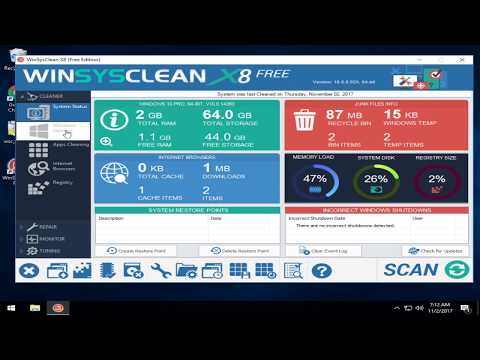
WinSysClean is a fully automated Windows system cleaner. Video tutorial available.
WinSysClean cleans/fixes/optimize your computer with a single mouse click.
WinSysClean is different from other System Cleaning Tools; it uses an advanced registry and file analysis to detect invalid entries. You don't need to make critical decisions to confirm which entries/files to be removed because it does this for you safely.
WinSysClean Features:
● It can remove specific types of files that common disk utilities, uninstall, setup, defrag, scan disk, and other cleaner type programs will miss.
● You can choose from many cleaning options or let WinSysClean do it for you.
● Cleans your registry by deleting invalid uninstall entries and other wasted registry entries left by programs after uninstalling them.
● Removes Invalid COM/OLE Registry Entries.
● Cleans the Windows Recycle Bin.
● Removes the Windows Documents History.
● Deletes Windows Hotfix uninstall files.
● Deletes the Windows RUN History.
● Cleans the Internet Explorer Cache Folder.
● Cleans the Internet Explorer Cookies Folder.
● Cleans the Internet Downloaded Files Folder by permanently deleting its content.
● Deletes the Internet Explorer typed URL history.
● Deletes the Internet Explorer Visited URL history.
● Deletes the Windows Registry Backup files (these backup files are created at every Windows Startup, and it is wasting very much disk space).
Similar:
● Best Drive Cleaner? CCleaner VS Wise Disk Cleaner VS PrivaZer
● How to Use Storage Sense to Delete Junk Files in Windows 10 & 11 Automatically
WinSysClean cleans/fixes/optimize your computer with a single mouse click.
WinSysClean is different from other System Cleaning Tools; it uses an advanced registry and file analysis to detect invalid entries. You don't need to make critical decisions to confirm which entries/files to be removed because it does this for you safely.
▶
WinSysClean Features:
● It can remove specific types of files that common disk utilities, uninstall, setup, defrag, scan disk, and other cleaner type programs will miss.
● You can choose from many cleaning options or let WinSysClean do it for you.
● Cleans your registry by deleting invalid uninstall entries and other wasted registry entries left by programs after uninstalling them.
● Removes Invalid COM/OLE Registry Entries.
● Cleans the Windows Recycle Bin.
● Removes the Windows Documents History.
● Deletes Windows Hotfix uninstall files.
● Deletes the Windows RUN History.
● Cleans the Internet Explorer Cache Folder.
● Cleans the Internet Explorer Cookies Folder.
● Cleans the Internet Downloaded Files Folder by permanently deleting its content.
● Deletes the Internet Explorer typed URL history.
● Deletes the Internet Explorer Visited URL history.
● Deletes the Windows Registry Backup files (these backup files are created at every Windows Startup, and it is wasting very much disk space).
Similar:
● Best Drive Cleaner? CCleaner VS Wise Disk Cleaner VS PrivaZer
● How to Use Storage Sense to Delete Junk Files in Windows 10 & 11 Automatically
Limitations:
Pro version is $39.00.
Editor's Note:
64-Bit only.
 Screenshot for WinSysClean
Top Downloads In Drive Cleaners
 WinSysClean 23.0 [ 2026-09-21 08:49:11 | 19 MB | Freemium | 11|10|8 | 4 ] PrivaZer 4.0.126 [ 2026-08-28 11:17:30 | 28 MB | Freemium | 11|10|8|7 | 4 ] CCleaner Standard 7.11.1522.0 [ 2026-09-16 08:50:01 | Size Varies | Ad-Supported | 11|10|8|7|macOS | 5 ] CCleaner Portable 6.4.1.11567 [ 2026-06-20 15:32:10 | 78 MB | Ad-Supported | 11|10|8|7 | 5 ] CCleaner Slim 6.4.1.11567 [ 2026-06-20 15:32:09 | 81 MB | Ad-Supported | 11|10|8|7|macOS | 5 ]
 Tactical Briefings
Comment Rules & Etiquette - We welcome all comments from our readers, but any comment section requires some moderation. Some posts are auto-moderated to reduce spam, including links and swear words. When you make a post, and it does not appear, it went into moderation. We are emailed when posts are marked as spam and respond ASAP. Some posts might be deleted to reduce clutter. Examples include religion, politics, and comments about listing errors (after we fix the problem and upvote your comment). Finally, be nice. Thank you for choosing MajorGeeks.

© 2000-2026 MajorGeeks.com
Powered by Contentteller® CMS System