


5 Apps To Keep Your Android Running Smooth
Posted by: Jon Ben-Mayor on 03/15/2016 01:49 AM
[
 Comments
]
Comments
]
Keeping your Android device running smooth isn't magic - either you are running limited apps on the device or you use some type of tool for keeping it clean and running smoothly. We have a healthy Android section here on MajorGeeks with more apps being added all the time. As part of that Android section, we list some 5 star tools that will assist you in keeping your device running like new.

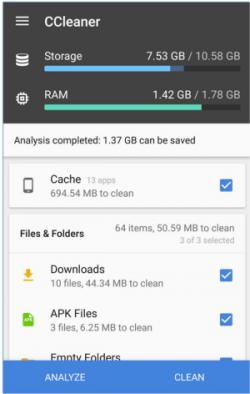 CCleaner for Android comes from Piriform, the makers of the world’s most popular PC and Mac cleaning software.
This app will effectively remove junk, reclaim space, monitor your system and allow you to browse safely.
Optimize and Clean
Speed up your phone and remove junk safely
Clean application cache, download folders, browser history, clipboard content and more
Delete call logs and SMS messages individually, in bulk, by age or by contact
Reclaim Storage Space
Streamline your Android smartphone or tablet
Quickly and easily uninstall multiple unwanted applications
Free up valuable storage space on your device
Easy to Use
Optimize your Android in just a few clicks
Simple, intuitive user interface which is easy to navigate
Totally free from Ads and clutter
Fast, compact and efficient with low memory and CPU usage
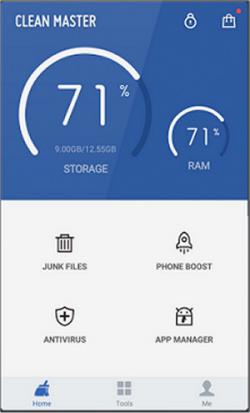
Clean Master is another nice tool that will clean out your junk files, clear out your private information, uninstall and backup, and kill rogue apps on your Android device.
This is similar to CCleaner for your Android device. It can clean up all sort of garbage on your phone and even free up memory. Easy to use and understand and as far as I can tell by the many times I used it, also very safe.
Clean Master for Android can:
Clean - Cache files and residual files that take up valuable storage space
Clear - Protect your privacy by deleting personal information such as SMS records, search history, and browser history
App Management - Move apps to sd card, uninstall system/preinstalled apps and backup APK files
Task Killer - Shut down poorly coded apps to save battery and optimize Android's performance with Clean Master.
Monitor your System
Check the usage of your CPU
Keep track of your RAM and internal storage space
Check out your battery levels and temperature
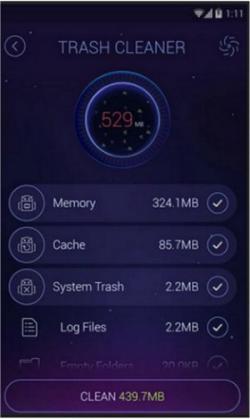 DU Speed Booster for Android is and all-in-one optimizer & cleaner with built-in antivirus security features. It can boost the speed of your phone, clean junk (cache) files from your system, and increase the available storage space on your SD card, and more.
DU Speed Booster for Android Features:
Easily Boost: A single touch saves you time and effort to boost your phone.
Junk File Cleaner: Fully scan and clean up every bit of junk and cache files.
Smart Cleaner: Pre-set automatic cleanup of unwanted processes and trash.
Powerful Speed Booster: Boost the speed of your Android by up to 60%!
Security Optimizer & Master: Make sure your phone is secure and protected from viruses or Trojans.
Network Speed Test: Test your upload and download speed in just one tap.
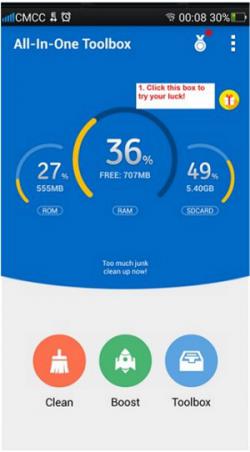
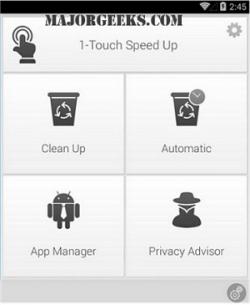
All-In-One Toolbox (Cleaner) for Android provides you with a one-stop solution for optimizing the performance of your Android device. Everything you need to keep your Android device running at peak performance is right at your fingertips.
It combines 29+ easy to use tools to keep your device clean, fast and smart. It helps to clean junk files, reclaim storage, kill running tasks, boost speed, save battery, manage files, lock apps, detect ads, check permissions, read device info, do quick settings and more...
All-In-One Toolbox (Cleaner) for Android Features:
Junk & Cache Cleaner
Task Killer & Memory Booster
App Manager
File Manager
Privacy Protector
App Locker
Device Info
Ashampoo Droid Optimizer is another nice offering in this genre and will tackle common problems like; lag, battery drain, and slow app launching.
Boost your smartphone performance and free up memory at the click of a button with Ashampoo Droid Optimizer.
Ashampoo Droid Optimizer Features:
Terminate foreground and background apps automatically
Empty the system and application cache
Clear your browsing history for better privacy
Find and delete big files fast and easily
Carry out cleaning tasks automatically
Conserve energy and enhance your battery life
Manage all installed apps
Learn about your apps' critical permissions and expose spy apps
CCleaner for Android comes from Piriform, the makers of the world’s most popular PC and Mac cleaning software.This app will effectively remove junk, reclaim space, monitor your system and allow you to browse safely.
Optimize and Clean
Reclaim Storage Space
Easy to Use
Clean Master is another nice tool that will clean out your junk files, clear out your private information, uninstall and backup, and kill rogue apps on your Android device.
This is similar to CCleaner for your Android device. It can clean up all sort of garbage on your phone and even free up memory. Easy to use and understand and as far as I can tell by the many times I used it, also very safe.
Clean Master for Android can:
Clean - Cache files and residual files that take up valuable storage space
Clear - Protect your privacy by deleting personal information such as SMS records, search history, and browser history
App Management - Move apps to sd card, uninstall system/preinstalled apps and backup APK files
Task Killer - Shut down poorly coded apps to save battery and optimize Android's performance with Clean Master.
Monitor your System
DU Speed Booster for Android is and all-in-one optimizer & cleaner with built-in antivirus security features. It can boost the speed of your phone, clean junk (cache) files from your system, and increase the available storage space on your SD card, and more.DU Speed Booster for Android Features:
All-In-One Toolbox (Cleaner) for Android provides you with a one-stop solution for optimizing the performance of your Android device. Everything you need to keep your Android device running at peak performance is right at your fingertips.
It combines 29+ easy to use tools to keep your device clean, fast and smart. It helps to clean junk files, reclaim storage, kill running tasks, boost speed, save battery, manage files, lock apps, detect ads, check permissions, read device info, do quick settings and more...
All-In-One Toolbox (Cleaner) for Android Features:
Ashampoo Droid Optimizer is another nice offering in this genre and will tackle common problems like; lag, battery drain, and slow app launching.
Boost your smartphone performance and free up memory at the click of a button with Ashampoo Droid Optimizer.
Ashampoo Droid Optimizer Features:
Comments
