


Activate God Mode for Windows 10, 8 and 7
Posted by: Timothy Tibbetts on 12/26/17 01:35 am
[
 Comments
]
Comments
]
Maybe you have heard about ‘God Mode,' something that allows you to access all sorts of settings you usually can’t see or find in Windows 7 or 8? It's your control panel on steroids. There are free programs to do this for you (at the end of this story) but it also very easy to activate yourself in less than a minute. Here’s how:
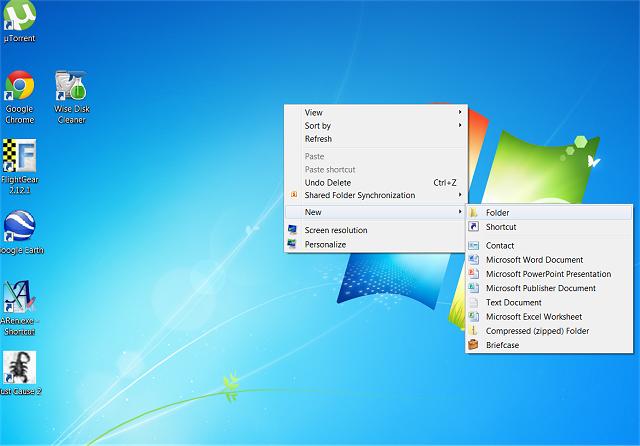
Optionally, if you don't want a desktop icon you can create a new folder in your C: drive by using either Windows Explorer or My Computer and simply right click on C: and select New, Folder. You can then access it there anytime.
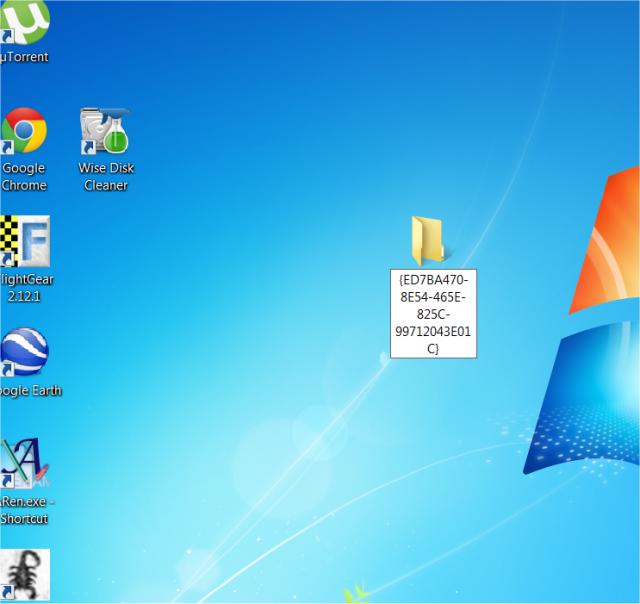
Step 2: Copy and paste this for the new folder name:
GodMode.{ED7BA470-8E54-465E-825C-99712043E01C}
See screenshot below:
Step 3:
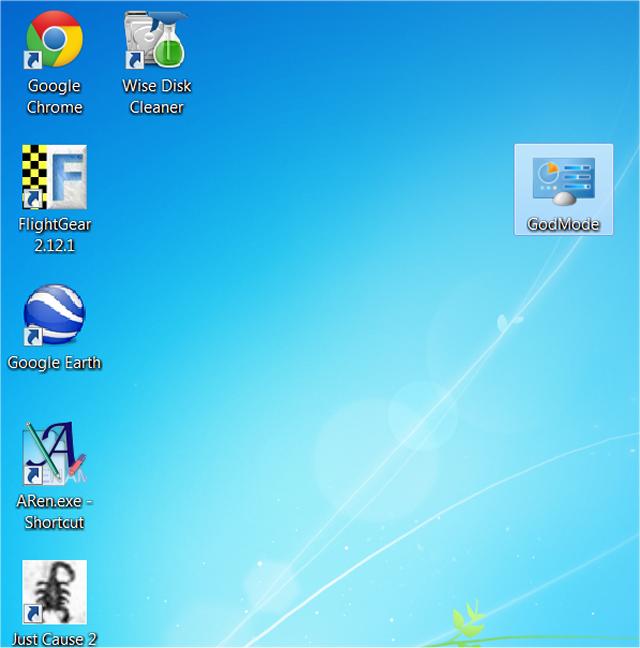
The folder will now be a shortcut to 'God Mode' on your desktop. See screenshot below.
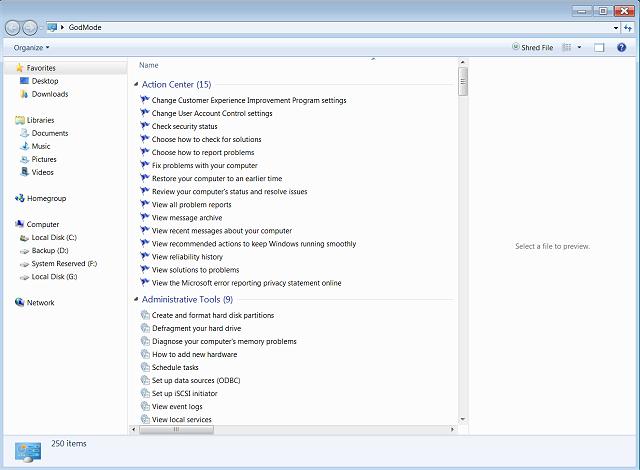
When you click it, you will find tons of hidden settings you can modify. See screenshot below:
Note on Windows 8. If you get just a new folder with numbers and letter in it, then delete that new folder and start over after you open Windows File Explorer (lower left) and change two settings under the View tab of Windows File Explorer. Check the boxes: File name extensions and Hidden items.
If you don't want to do this manually, here are some small, free programs that do it for you:
7GMode
MyGodMode
God Mode for Windows
Windows 7 God Mode Tool
God Mode Maker
GodMode Creator
Optionally, if you don't want a desktop icon you can create a new folder in your C: drive by using either Windows Explorer or My Computer and simply right click on C: and select New, Folder. You can then access it there anytime.
Step 2: Copy and paste this for the new folder name:
GodMode.{ED7BA470-8E54-465E-825C-99712043E01C}
See screenshot below:
Step 3:
The folder will now be a shortcut to 'God Mode' on your desktop. See screenshot below.
When you click it, you will find tons of hidden settings you can modify. See screenshot below:
Note on Windows 8. If you get just a new folder with numbers and letter in it, then delete that new folder and start over after you open Windows File Explorer (lower left) and change two settings under the View tab of Windows File Explorer. Check the boxes: File name extensions and Hidden items.
If you don't want to do this manually, here are some small, free programs that do it for you:
7GMode
MyGodMode
God Mode for Windows
Windows 7 God Mode Tool
God Mode Maker
GodMode Creator
Comments
