


Bank of America users targeted by phishing attack
Posted by: Timothy Weaver on 03/21/15 05:12 am
[
 Comments
]
Comments
]
Bank of America customers are again being targeted by scammers.
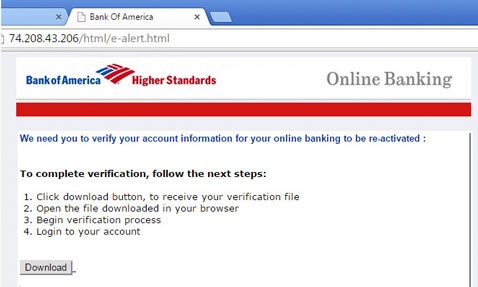
The scam link directs them to a site where they are asked to give all of their personal and banking info.
The info asked for is personal information (name, date of birth, address, phone number, social security number, mother's maiden name, driver license number), email address information (email address, password), and payment card information (number, expire [sic] date, CVV). The phishers also ask for the answers to the three security questions the users set up during their initial registration with the bank.
More savvy users will note that the original link has nothing to do with the Bank of America.
If you have fallen victim to such a scam, you need to immediately contact the bank and alert them to the scam. You also need to reset your information that can be changed (security questions), and ask that they issue you a new payment card.
You should also change any log in info as well as passwords for your email accounts.
Source: NetSecurity
The scam link directs them to a site where they are asked to give all of their personal and banking info.
The info asked for is personal information (name, date of birth, address, phone number, social security number, mother's maiden name, driver license number), email address information (email address, password), and payment card information (number, expire [sic] date, CVV). The phishers also ask for the answers to the three security questions the users set up during their initial registration with the bank.
More savvy users will note that the original link has nothing to do with the Bank of America.
If you have fallen victim to such a scam, you need to immediately contact the bank and alert them to the scam. You also need to reset your information that can be changed (security questions), and ask that they issue you a new payment card.
You should also change any log in info as well as passwords for your email accounts.
Source: NetSecurity
Comments
