


Bart Ransomware Free Decrypter
Posted by: Timothy Weaver on 07/22/16 05:19 am
[
 Comments
]
Comments
]
Researchers from AVG have found a way to decrypt files that are zipped by the Bart Ransomware only a month after it first appeared.
One, Bart is being distributed by one of the biggest botnets in the world. The same botnet that was used to distribute both the Dridex banking trojan and the Locky ransomware.
Second, Bart does not encrypt your files. It gathers them together and places them in a password protected zip file.
The decryption method is relatively simple. First, download the decrypter from MajorGeeks.
Next, select the hard drive locations where Bart has locked your files in password-protected ZIP files.
Finally, you need to identify two versions of the same file to compare. To find an original file, either use one from your Dropbox account, a file you received via email, or you stored on another computer or portable flash drives.
After that is just a matter of point and click.
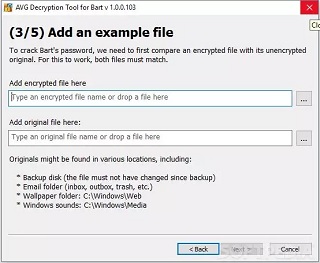
Source: SoftPedia
One, Bart is being distributed by one of the biggest botnets in the world. The same botnet that was used to distribute both the Dridex banking trojan and the Locky ransomware.
Second, Bart does not encrypt your files. It gathers them together and places them in a password protected zip file.
The decryption method is relatively simple. First, download the decrypter from MajorGeeks.
Next, select the hard drive locations where Bart has locked your files in password-protected ZIP files.
Finally, you need to identify two versions of the same file to compare. To find an original file, either use one from your Dropbox account, a file you received via email, or you stored on another computer or portable flash drives.
After that is just a matter of point and click.
Source: SoftPedia
Comments
