


Buttercup Provides Total Password Management
Posted by: Jon Ben-Mayor on 06/12/17 01:36 am
[
 Comments
]
Comments
]
Buttercup is a password manager for all your accounts built for your desktop or Google Chrome.
Stop the madness and get a password manager. It takes no longer than it does to write it down and you can always have a backup. Buttercup is one such choice.
From the main screen, you can open an archive, create a new archive and load from cloud services including DropBox, OwnCloud, and others. No account is needed.
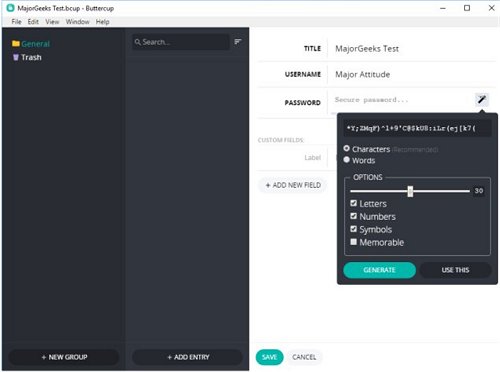
You can now create a new entry using Title, Username, and Password. You can also create custom fields. Buttercup can also suggest some pretty complex passwords for you as well. Click save, and you've created your first password. Be careful if you create a field and leave it empty as it will cause an error.
Buttercup also allows you to create categories. For example, you could create categories for credit cards, social media, bank accounts, games, email accounts, and anything you want. These categories make it easy to find your password should you have a lot of them.
Buttercup isn't rocket science. It simplifies the saving of all your passwords without trying to do more than it needs. If you just want to simply keep track of your passwords, look no further than Buttercup.
Download @ http://www.majorgeeks.com/files/details/buttercup.html
Stop the madness and get a password manager. It takes no longer than it does to write it down and you can always have a backup. Buttercup is one such choice.
From the main screen, you can open an archive, create a new archive and load from cloud services including DropBox, OwnCloud, and others. No account is needed.
You can now create a new entry using Title, Username, and Password. You can also create custom fields. Buttercup can also suggest some pretty complex passwords for you as well. Click save, and you've created your first password. Be careful if you create a field and leave it empty as it will cause an error.
Buttercup also allows you to create categories. For example, you could create categories for credit cards, social media, bank accounts, games, email accounts, and anything you want. These categories make it easy to find your password should you have a lot of them.
Buttercup isn't rocket science. It simplifies the saving of all your passwords without trying to do more than it needs. If you just want to simply keep track of your passwords, look no further than Buttercup.
Download @ http://www.majorgeeks.com/files/details/buttercup.html
Comments
