


Calculate, Verify Hash Values With HashTools
Posted by: Jon Ben-Mayor on 01/30/2016 02:56 AM
[
 Comments
]
Comments
]
HashTools provides you with an foolproof solution to calculate and verify has values to ensure that you have downloaded only the intended file - without any special extra bits to potentially open your machine up to a myriad of issues.
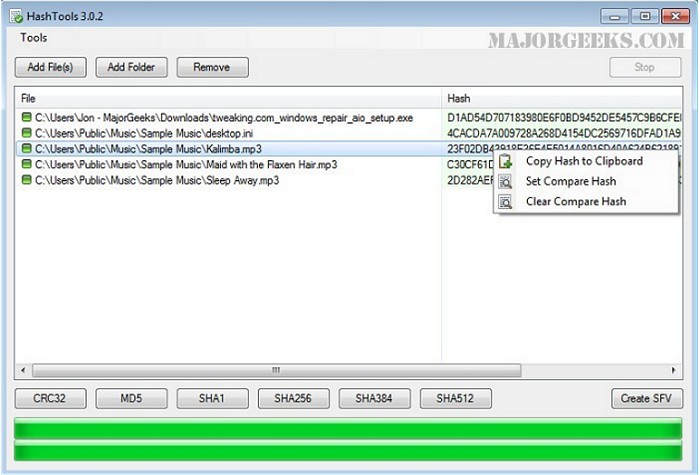
HashTools can also add itself to the Windows Explorer context menu for further ease of use. To use this utility is quite simple, just select a file to generate a hash for, click on the button for the type of hash you are looking to generate and watch the result magically appear.
Once a hash is generated you can copy it to the clipboard, or automatically compare hashes to make sure your file is intact. No complexity here, HashTools is designed to be quick and efficient in its use, and the UI follows suit - easy on the eyes with all buttons prominently displayed.
Give HashTools a try, it's lightweight and for the price of $0.00 for the knowledge that the file you downloaded is intact how can you lose?
Download @ http://www.majorgeeks.com/files/details/hashtools.html
HashTools can also add itself to the Windows Explorer context menu for further ease of use. To use this utility is quite simple, just select a file to generate a hash for, click on the button for the type of hash you are looking to generate and watch the result magically appear.
Once a hash is generated you can copy it to the clipboard, or automatically compare hashes to make sure your file is intact. No complexity here, HashTools is designed to be quick and efficient in its use, and the UI follows suit - easy on the eyes with all buttons prominently displayed.
Give HashTools a try, it's lightweight and for the price of $0.00 for the knowledge that the file you downloaded is intact how can you lose?
Download @ http://www.majorgeeks.com/files/details/hashtools.html
Comments
