


Cerber Ransomware Decryptor Available
Posted by: Timothy Weaver on 08/18/16 07:22 am
[
 Comments
]
Comments
]
BleepingComputer announced today that Check Point has released a decryption service for the Cerber Ransomware version 1 and version 2. This will allow anyone victimized by the ransomware to decrypt their files for free. This tool will work on any files with the extension .cerber and .cerber2.
It would appear that Check Point probably acquired the master key rather than finding a weakness in the encryption algorithm.
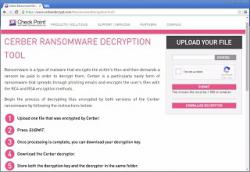
The service is easy to use. The victim first must visit the CerberDecrypt.com site and upload an encrypted .CERBER or .CERBER2 file that is 1MB or smaller. Check Point will then make the decryption key available for download. The victim then just downloads the key, which will be named pk, and the decryptor to the same folder.
It is then just a matter of clicking on the decryptor and allowing the file to work. As an extra bonus, the decryptor will also remove any ransom notes that are located on the Windows desktop.
Check Point also reports that inspite of a 0.3% payment rate, the ransomware still brought in $2.3 million.
Source: BleepingComputer
It would appear that Check Point probably acquired the master key rather than finding a weakness in the encryption algorithm.
The service is easy to use. The victim first must visit the CerberDecrypt.com site and upload an encrypted .CERBER or .CERBER2 file that is 1MB or smaller. Check Point will then make the decryption key available for download. The victim then just downloads the key, which will be named pk, and the decryptor to the same folder.
It is then just a matter of clicking on the decryptor and allowing the file to work. As an extra bonus, the decryptor will also remove any ransom notes that are located on the Windows desktop.
Check Point also reports that inspite of a 0.3% payment rate, the ransomware still brought in $2.3 million.
Source: BleepingComputer
Comments
