


CopyQ Takes Your Clipboard to an Entirely New Level
Posted by: Timothy Tibbetts on 05/13/17 12:51 am
[
 Comments
]
Comments
]
CopyQ is a clipboard manager with searchable and editable history plus support for image formats, command line control and more.
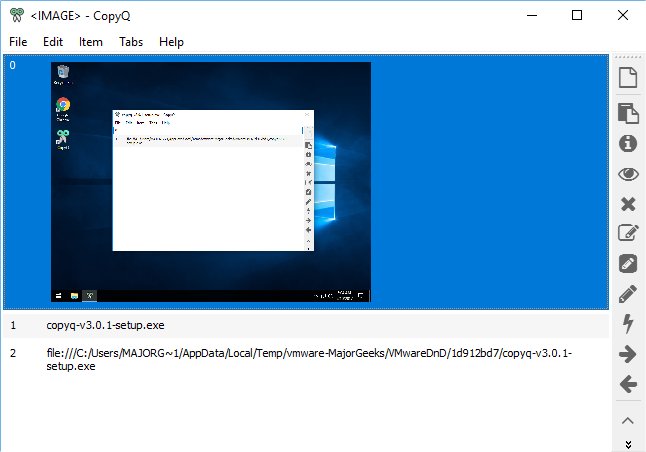
CopyQ will reside in your tray, so you won't even know it's there; until you need it. It copied everything we threw at it on the clipboard including text, links, and images. Easy-to-use buttons are found on the far right. These let you quickly access information on any highlighted clipboard item including content, preview, delete, edit and many more actions. If you click on edit for any clipboard item, you get a whole new set of tools including fonts, save, foreground, strike-through style, erase, and more.
We found some quirks if you will, but nothing major. It's more about getting used to the interface depending on your needs. Overall, there's a lot here to do with the clipboard, so we're OK with that. One example is going back after you open an item. A close icon would be handy, and repeatedly we couldn't find our way back. File, Exit, and No got us back. Deleting an item opens a new, empty window. Weird, but certainly not a deal breaker.
The standard clipboard only keeps the last item you copied. CopyQ on the other hand monitors and stores it all giving you clipboard access beyond anything you will ever need.
Download @ http://www.majorgeeks.com/files/details/copyq.html
CopyQ will reside in your tray, so you won't even know it's there; until you need it. It copied everything we threw at it on the clipboard including text, links, and images. Easy-to-use buttons are found on the far right. These let you quickly access information on any highlighted clipboard item including content, preview, delete, edit and many more actions. If you click on edit for any clipboard item, you get a whole new set of tools including fonts, save, foreground, strike-through style, erase, and more.
We found some quirks if you will, but nothing major. It's more about getting used to the interface depending on your needs. Overall, there's a lot here to do with the clipboard, so we're OK with that. One example is going back after you open an item. A close icon would be handy, and repeatedly we couldn't find our way back. File, Exit, and No got us back. Deleting an item opens a new, empty window. Weird, but certainly not a deal breaker.
The standard clipboard only keeps the last item you copied. CopyQ on the other hand monitors and stores it all giving you clipboard access beyond anything you will ever need.
Download @ http://www.majorgeeks.com/files/details/copyq.html
Comments
