


Facebook changes default privacy settings for new users
Posted by: Jon Ben-Mayor on 05/22/14 04:58 am
[
 Comments
]
Comments
]
Facebook has changed the default settings for new status updates from Public to Friends, which according to the company, should make it easier to share things with who you really want.
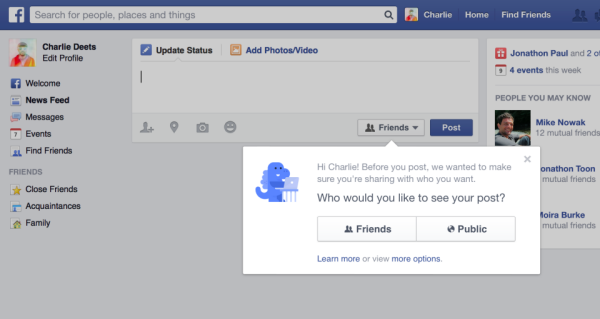
So, going forward, when new people join Facebook, the default audience of their first post will be set to Friends. Previously, for most people, it was set to Public.
First time posters will also see a reminder to choose an audience for their first post, and if they don’t make a choice, it will be set to Friends. People can change who they are posting to at any time, and can also change the privacy of their past posts too.
Over the next few weeks, we’ll start rolling out a new and expanded privacy checkup tool, which will take people through a few steps to review things like who they’re posting to, which apps they use, and the privacy of key pieces of information on their profile.
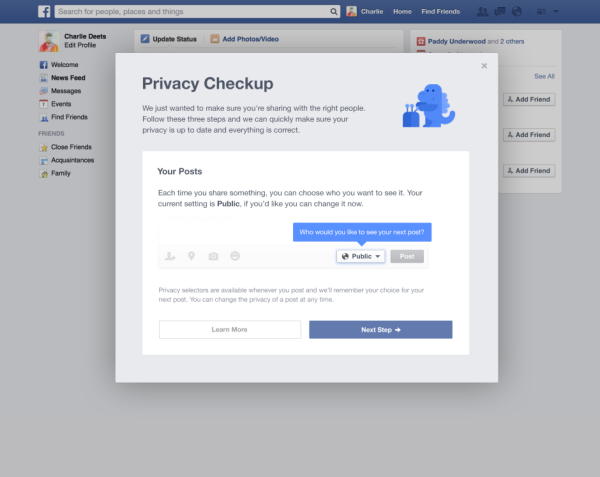
We want to do all we can to put power and control in people’s hands. This new tool is designed to help people make sure they are sharing with just the audience they want. Everything about how privacy works on Facebook remains the same.
So, going forward, when new people join Facebook, the default audience of their first post will be set to Friends. Previously, for most people, it was set to Public.
First time posters will also see a reminder to choose an audience for their first post, and if they don’t make a choice, it will be set to Friends. People can change who they are posting to at any time, and can also change the privacy of their past posts too.
Over the next few weeks, we’ll start rolling out a new and expanded privacy checkup tool, which will take people through a few steps to review things like who they’re posting to, which apps they use, and the privacy of key pieces of information on their profile.
We want to do all we can to put power and control in people’s hands. This new tool is designed to help people make sure they are sharing with just the audience they want. Everything about how privacy works on Facebook remains the same.
Comments
