


Fake MSE Installer Delivers Malware
Posted by: Timothy Weaver on 10/25/16 06:02 am
[
 Comments
]
Comments
]
Another fake tech support scam is making the rounds and tricking users with a fake BSOD.
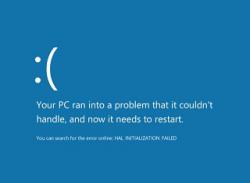 This mimics an installer that purports to be installing Microsoft Security Essentials. But when clicked on after installing, it hides the mouse cursor, disables Task Manager and then turns into a fake BSOD with a phone number to call for assistance.
The phone number is still active and the voice on the other end says you have reached a “Microsoft-certified support company” but wouldn’t provide any information about where it was located or what its name is.
Users are being tricked partly because MSE has not been shipped with Windows 8 or 10. MSE was bundled with Windows 7 and dropped in 8 and 10 in favor of Windows Defender.
If you have encountered the malware, Microsoft wants to know about it and wants the victim to call not only them but also the Federal Trade Commission.
Source: Threat Post
This mimics an installer that purports to be installing Microsoft Security Essentials. But when clicked on after installing, it hides the mouse cursor, disables Task Manager and then turns into a fake BSOD with a phone number to call for assistance.The phone number is still active and the voice on the other end says you have reached a “Microsoft-certified support company” but wouldn’t provide any information about where it was located or what its name is.
Users are being tricked partly because MSE has not been shipped with Windows 8 or 10. MSE was bundled with Windows 7 and dropped in 8 and 10 in favor of Windows Defender.
If you have encountered the malware, Microsoft wants to know about it and wants the victim to call not only them but also the Federal Trade Commission.
Source: Threat Post
Comments
