


Give Your Eyes a Break With CareUEyes
Posted by: Jon Ben-Mayor on 11/27/17 02:40 am
[
 Comments
]
Comments
]
Sitting in front of a computer screen for long periods of time can take its toll on your vision as well as other health issues like headaches, fatigue, etc. Giving your eyes a break is essential to prevent them.
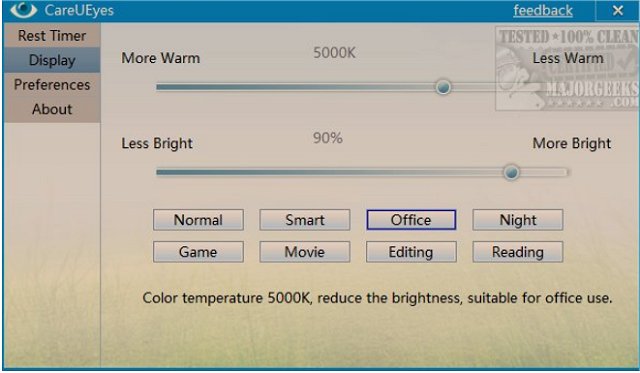
CareUEyes has a pleasant interface, and it's quite simple to use. By default, you begin with the display settings that allow you to use sliders for warmth and brightness. Presets are available for Normal, Smart, Office, Night, Game, Movie, Editing, and Reading. Each preset, when clicked, explains the goal behind that preset.
There's a separate tab for rest intervals. You can define when the next rest is, and for how long. When the clock is running, you can right-click on it and take your break now, change the intervals, and much more.
Preferences allow you to start with Windows, use the tray icon, mini float, force rest, and do not disturb when full screen.
One would think a break timer app isn't rocket science. CareUEyes does it simply, efficiently and the preset color modes make it stand out from the pack.
Download @ http://www.majorgeeks.com/files/details/careueyes.html
CareUEyes has a pleasant interface, and it's quite simple to use. By default, you begin with the display settings that allow you to use sliders for warmth and brightness. Presets are available for Normal, Smart, Office, Night, Game, Movie, Editing, and Reading. Each preset, when clicked, explains the goal behind that preset.
There's a separate tab for rest intervals. You can define when the next rest is, and for how long. When the clock is running, you can right-click on it and take your break now, change the intervals, and much more.
Preferences allow you to start with Windows, use the tray icon, mini float, force rest, and do not disturb when full screen.
One would think a break timer app isn't rocket science. CareUEyes does it simply, efficiently and the preset color modes make it stand out from the pack.
Download @ http://www.majorgeeks.com/files/details/careueyes.html
Comments
