


Google removes Android privacy feature in 4.4.2 update
Posted by: Jon Ben-Mayor on 12/14/13 01:59 am
[
 Comments
]
Comments
]
The feature in question is one that allows users to install an app without it collecting sensitive data like the user's location or address book. The 'App Ops' feature was removed earlier this week with the release of Android 4.4.2.
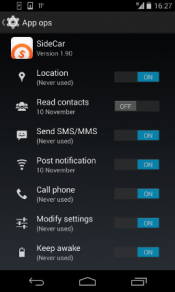 According to the Electronic Frontier Foundation (EFF), the disappearance of App Ops is alarming news for Android users. The fact that they cannot turn off app permissions is a Stygian hole in the Android security model, and a billion people's data is being sucked through. Embarrassingly, it is also one that Apple managed to fix in iOS years ago.
A moment ago, it looked as though Google cared about this massive privacy problem. Now we have our doubts. The only way to dispel them, frankly, is for Google to urgently reenable the App Ops interface, as well as adding some polish and completing the fundamental pieces that it is missing.
EFF goes on to say that if privacy is important to you - think twice about accepting the update to 4.4.2. Keep in mind that by doing so will create a catastrophic situation, because the update to Android 4.4.2 contains fixes to security and denial-of-service bugs.
Privacy over security? I have nothing to hide - I will take security at this point and hope that Google will return the feature in the future.
According to the Electronic Frontier Foundation (EFF), the disappearance of App Ops is alarming news for Android users. The fact that they cannot turn off app permissions is a Stygian hole in the Android security model, and a billion people's data is being sucked through. Embarrassingly, it is also one that Apple managed to fix in iOS years ago.A moment ago, it looked as though Google cared about this massive privacy problem. Now we have our doubts. The only way to dispel them, frankly, is for Google to urgently reenable the App Ops interface, as well as adding some polish and completing the fundamental pieces that it is missing.
EFF goes on to say that if privacy is important to you - think twice about accepting the update to 4.4.2. Keep in mind that by doing so will create a catastrophic situation, because the update to Android 4.4.2 contains fixes to security and denial-of-service bugs.
Privacy over security? I have nothing to hide - I will take security at this point and hope that Google will return the feature in the future.
Comments
