


Graphically Visualize Your Hard Drive Space with HDGraph
Posted by: Jon Ben-Mayor on 06/28/17 01:47 am
[
 Comments
]
Comments
]
HDGraph can draw multi-level pie charts of disk space that shows a graphical view of used hard drive space.
The first scan was very fast scanning our VMware 60 GB drive in about 5 seconds. We received some errors about accessing certain files and found out that running HDGraph in administrator more did away with about half of those, so be sure to do this to get a more accurate assessment.
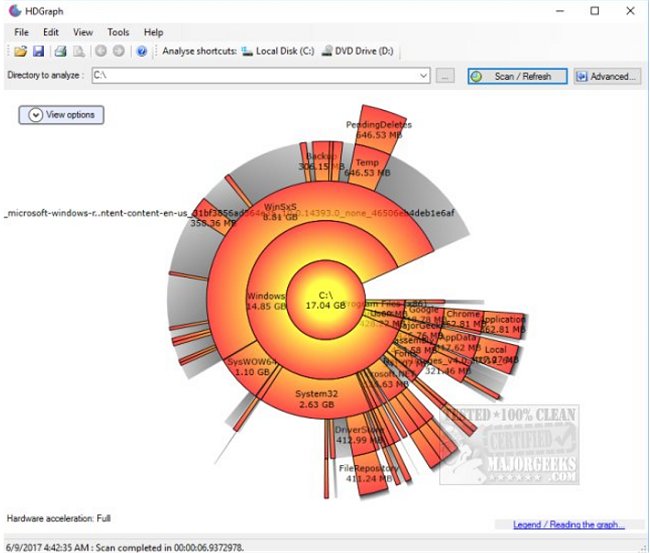
You are then given a graphical pie chart making it easy to determine where your space is used. If you have difficulty seeing the results you can change the colors to whatever suits your needs. An advanced tab can be found to the right and gives you quick access to draw options, rotations, tooltips, and more. Optionally, you can select only certain folders if you like.
Some of the text over the individual pies are hard to read, particularly since the pie fragments get smaller as you get further to the outside but typically you're using this to look for larger, wasted space so that shouldn't be a big issue for most.
Line your mouse over any pie, and you will get all the details from that folder. Right-click and you can get details, open the folder, refresh, center the graph, and delete directory and subdirectories.
HDGraph does an excellent job of displaying all your drive space used in an easy to understand and attractive GUI. It's open source, and portable.
Download @ http://www.majorgeeks.com/files/details/hdgraph.html
The first scan was very fast scanning our VMware 60 GB drive in about 5 seconds. We received some errors about accessing certain files and found out that running HDGraph in administrator more did away with about half of those, so be sure to do this to get a more accurate assessment.
You are then given a graphical pie chart making it easy to determine where your space is used. If you have difficulty seeing the results you can change the colors to whatever suits your needs. An advanced tab can be found to the right and gives you quick access to draw options, rotations, tooltips, and more. Optionally, you can select only certain folders if you like.
Some of the text over the individual pies are hard to read, particularly since the pie fragments get smaller as you get further to the outside but typically you're using this to look for larger, wasted space so that shouldn't be a big issue for most.
Line your mouse over any pie, and you will get all the details from that folder. Right-click and you can get details, open the folder, refresh, center the graph, and delete directory and subdirectories.
HDGraph does an excellent job of displaying all your drive space used in an easy to understand and attractive GUI. It's open source, and portable.
Download @ http://www.majorgeeks.com/files/details/hdgraph.html
Comments
