


Has Piriform pulled the “Slim” version of CCleaner? (Updated)
Posted by: Timothy Tibbetts on 08/28/2014 03:52 AM
[
 Comments
]
Comments
]
We have seen a handful of companies get greedy or try to get themselves ready for sale over the years and it usually starts the same way – by not wanting websites to host their files, essentially giving up free publicity and often millions of downloads.
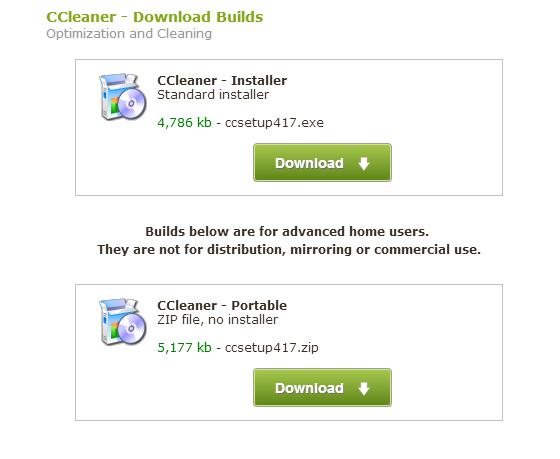
Piriform seems to be headed that route. Not too long ago they added third party software (Bundleware) to their programs but you could wait 5 days and get the Slim version. As of today, the Slim version is no longer listed on their website so you will need to dodge their attempts to bundle other software with their Standard download.
While I don’t begrudge someone making money, I am not a fan of a program that is supposed to clean your hard drive, registry and start-up while trying to add the exact same thing.
A couple of weeks ago we received an electronic cease and desist letter from them about hosting their files. We didn’t think much of it until today when it was pointed out that the Slim link no longer works. The portable version is still there and it does refer to “Builds Below” on their download page so maybe they just pulled it for the 5 days? All direct file links also no longer work. So, to summarize:
1: No Slim version (?)
2: No direct file linking
3: Bundleware
Of course we have always lauded CCleaner but mostly because it’s a conservative cleaning tool and a Bundleware free Slim version was available. That ship appears to have sailed. Due to their recent changes we have moved on to Wise Disk Cleaner and suggest you do the same. It currently has no third party software, cleans much more than CCleaner and has never harmed any computers I ran it on.
We will know next week if it is gone for good. So, what do you think their reasons are? Leave a comment and or answer in the poll below.
Wise Disk Cleaner can be downloaded at http://www.majorgeeks.com/files/details/wise_disk_cleaner.html
Piriform seems to be headed that route. Not too long ago they added third party software (Bundleware) to their programs but you could wait 5 days and get the Slim version. As of today, the Slim version is no longer listed on their website so you will need to dodge their attempts to bundle other software with their Standard download.
While I don’t begrudge someone making money, I am not a fan of a program that is supposed to clean your hard drive, registry and start-up while trying to add the exact same thing.
A couple of weeks ago we received an electronic cease and desist letter from them about hosting their files. We didn’t think much of it until today when it was pointed out that the Slim link no longer works. The portable version is still there and it does refer to “Builds Below” on their download page so maybe they just pulled it for the 5 days? All direct file links also no longer work. So, to summarize:
1: No Slim version (?)
2: No direct file linking
3: Bundleware
Of course we have always lauded CCleaner but mostly because it’s a conservative cleaning tool and a Bundleware free Slim version was available. That ship appears to have sailed. Due to their recent changes we have moved on to Wise Disk Cleaner and suggest you do the same. It currently has no third party software, cleans much more than CCleaner and has never harmed any computers I ran it on.
We will know next week if it is gone for good. So, what do you think their reasons are? Leave a comment and or answer in the poll below.
Wise Disk Cleaner can be downloaded at http://www.majorgeeks.com/files/details/wise_disk_cleaner.html
Comments
