


Hijackers now using the NSA in their ransomware
Posted by: Timothy Tibbetts on 08/28/13 02:59 am
[
 Comments
]
Comments
]
Ransomware, sadly, is nothing new and these people are real scumbags. Naturally this means they have added posing as the NSA to scare you into paying up when your computer gets locked by their malicious software.
The ransomware appears after a user has either executed the malware or by being hit by a drive-by exploit. After some time, the malware covers the screen and makes it impossible for the user to get around the ransom notice by disabling the Task Manager and forcing the notice to the front of the screen; typical ransomware stuff.
As you can see in the screenshot below, this looks exactly like the FBI ransomware you have seen before, and people do fall for it.
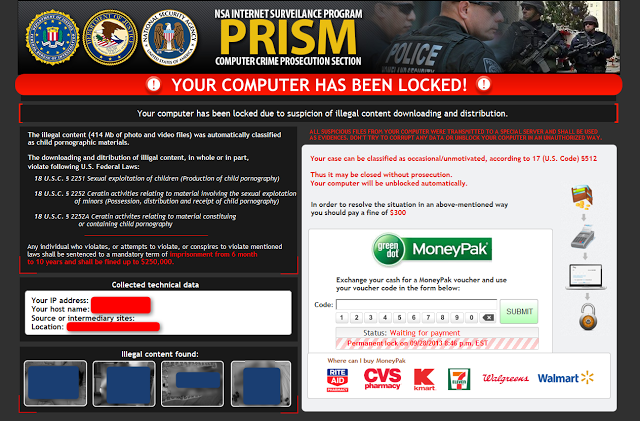
According to Malwarebytes, there are a few unique aspects to this Ransomware; the first being that it claims to be from the NSA and has, in big yellow letters at the top, the label PRISM. Utilizing the recent NSA leaks to their advantage, the attackers use false guilt and current events to fool the user into paying the $300 fine.
The second and third unique aspects (while one isn’t so unique, it is quite disturbing) is the inclusion of child pornography images at the bottom of the notice and the “Source or Intermediary Sites” that is a new feature of the Kovter ransom family.
If you get infected you can always find help in the Majorgeeks Support Forums.
The ransomware appears after a user has either executed the malware or by being hit by a drive-by exploit. After some time, the malware covers the screen and makes it impossible for the user to get around the ransom notice by disabling the Task Manager and forcing the notice to the front of the screen; typical ransomware stuff.
As you can see in the screenshot below, this looks exactly like the FBI ransomware you have seen before, and people do fall for it.
According to Malwarebytes, there are a few unique aspects to this Ransomware; the first being that it claims to be from the NSA and has, in big yellow letters at the top, the label PRISM. Utilizing the recent NSA leaks to their advantage, the attackers use false guilt and current events to fool the user into paying the $300 fine.
The second and third unique aspects (while one isn’t so unique, it is quite disturbing) is the inclusion of child pornography images at the bottom of the notice and the “Source or Intermediary Sites” that is a new feature of the Kovter ransom family.
If you get infected you can always find help in the Majorgeeks Support Forums.
Comments
