


How well does your AV software protect itself?
Posted by: Timothy Weaver on 11/25/14 05:08 am
[
 Comments
]
Comments
]
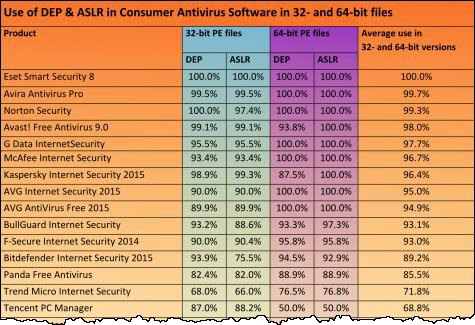
AV-Test Institute released its latest findings on how well an AV program protects itself from malware.
Two mature technologies exist that can thwart many exploits. Data Execution Protection (DEP) simply prevents code execution in any memory area that's marked as holding data. That alone wipes out one entry point for an exploit.
Address Space Layout Randomization (ASLR), as the name implies, shuffles the memory sectors used by a program, so the attacker can't predict where to find the sector holding the vulnerable code. Both techniques are used extensively in Windows itself. For most modern compilers, implementing each of these protective technologies is as easy as flipping a switch.
32-bit and 64-bit products were evaluated separately. ESET was the only consumer product with 100 percent coverage; Symantec was the only business product at that level. Avira, G Data, McAfee and AVG completely protect their 64-bit products with DEP and ASLR. However, coverage in their 32-bit editions ranged from 90 to not-quite-100 percent.
Full test results are available online.
Two mature technologies exist that can thwart many exploits. Data Execution Protection (DEP) simply prevents code execution in any memory area that's marked as holding data. That alone wipes out one entry point for an exploit.
Address Space Layout Randomization (ASLR), as the name implies, shuffles the memory sectors used by a program, so the attacker can't predict where to find the sector holding the vulnerable code. Both techniques are used extensively in Windows itself. For most modern compilers, implementing each of these protective technologies is as easy as flipping a switch.
32-bit and 64-bit products were evaluated separately. ESET was the only consumer product with 100 percent coverage; Symantec was the only business product at that level. Avira, G Data, McAfee and AVG completely protect their 64-bit products with DEP and ASLR. However, coverage in their 32-bit editions ranged from 90 to not-quite-100 percent.
Full test results are available online.
Comments
