


Kaspersky Labs identifies sophisticated Android trojan
Posted by: Jon on 06/07/13 08:10 am
[
 Comments
]
Comments
]
Kaspersky Labs recently discovered a new highly sophisticated multi-functional Trojan, capable of the exploiting a previously unknown flaw in the Android OS which allows itself to hide from the administrators list, which renders users unable to uninstall the app.
Also, the cybercriminals found an error in the Android operating system which relates to the processing of the AndroidManifest.xml file. This file exists in every Android application and is used to describe the application’s structure, define its launch parameters, etc. The malware modifies AndroidManifest.xml in such a way that it does not comply with Google standards, but is still correctly processed on a smartphone thanks to the exploitation of the identified vulnerability. All of this made it extremely difficult to run dynamic analysis on this Trojan.
The creators of Backdoor.AndroidOS.Obad.a also used yet another previously unknown error in the Android operating system. By exploiting this vulnerability, malicious applications can enjoy extended Device Administrator privileges without appearing on the list of applications which have such privileges. As a result of this, it is impossible to delete the malicious program from the smartphone after it gains extended privileges.
Finally, Backdoor.AndroidOS.Obad.a does not have an interface and works in background mode.
With the extended Device Administrator Privileges, the Trojan can block the device’s screen for up to 10 seconds. This typically happens after the device is connected to a free Wi-Fi network or Bluetooth is activated; with a connection established, the Trojan can copy itself and other malicious applications to other devices located nearby. It’s possible that this is how Backdoor.AndroidOS.Obad.a tries to prevent the user from discovering its malicious activity.
Unuchek says that “We have already informed Google about the Device Administrator vulnerability in Android."
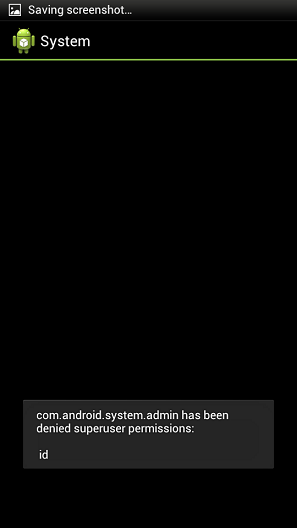
Denis Maslennikov, a senior malware analyst at Kaspersky Lab told PC World in addition, on rooted devices, the malware tries to gain root privileges by executing the “su id” command, like gaining administrative privileges, gaining root access requires user permission.
The new Trojan program is distributed through SMS spam, but is not very widespread at the moment. According to detection statistics from Kaspersky Lab, installation attempts for Obad.a amounted to only 0.15 percent of the total number of malware infection attempts on mobile devices over a three-day period.
Maslennikov believes that other Android malware threats will adopt advanced techniques like the ones used by this malware in the future. “We think that similar techniques are going to be more widespread very soon.”
Also, the cybercriminals found an error in the Android operating system which relates to the processing of the AndroidManifest.xml file. This file exists in every Android application and is used to describe the application’s structure, define its launch parameters, etc. The malware modifies AndroidManifest.xml in such a way that it does not comply with Google standards, but is still correctly processed on a smartphone thanks to the exploitation of the identified vulnerability. All of this made it extremely difficult to run dynamic analysis on this Trojan.
The creators of Backdoor.AndroidOS.Obad.a also used yet another previously unknown error in the Android operating system. By exploiting this vulnerability, malicious applications can enjoy extended Device Administrator privileges without appearing on the list of applications which have such privileges. As a result of this, it is impossible to delete the malicious program from the smartphone after it gains extended privileges.
Finally, Backdoor.AndroidOS.Obad.a does not have an interface and works in background mode.
With the extended Device Administrator Privileges, the Trojan can block the device’s screen for up to 10 seconds. This typically happens after the device is connected to a free Wi-Fi network or Bluetooth is activated; with a connection established, the Trojan can copy itself and other malicious applications to other devices located nearby. It’s possible that this is how Backdoor.AndroidOS.Obad.a tries to prevent the user from discovering its malicious activity.
Unuchek says that “We have already informed Google about the Device Administrator vulnerability in Android."
Denis Maslennikov, a senior malware analyst at Kaspersky Lab told PC World in addition, on rooted devices, the malware tries to gain root privileges by executing the “su id” command, like gaining administrative privileges, gaining root access requires user permission.
The new Trojan program is distributed through SMS spam, but is not very widespread at the moment. According to detection statistics from Kaspersky Lab, installation attempts for Obad.a amounted to only 0.15 percent of the total number of malware infection attempts on mobile devices over a three-day period.
Maslennikov believes that other Android malware threats will adopt advanced techniques like the ones used by this malware in the future. “We think that similar techniques are going to be more widespread very soon.”
Comments
