


Microsoft launches the Sculpt Ergonomic Desktop
Posted by: Jon Ben-Mayor on 08/14/13 04:07 am
[
 Comments
]
Comments
]
Microsoft has released a new keyboard and mouse combo to the masses; the Sculpt Ergonomic Desktop, which offers Windows 8 specific hotkeys that will give you one-touch access to some of the most commonly used functions. Codenamed “Manta Ray,” the revamped set of keyboard and mouse is claimed to be built on advanced ergonomic principles, with a split keyboard design, which, Microsoft said, can keep wrists and forearms in a relaxed position.
Microsoft explains that the Sculpt Ergonomic Desktop is a combination of the Sculpt Ergonomic Keyboard and the Sculpt Ergonomic Mouse. The keyboard incorporates a split layout. When I first laid eyes on the keyboard, it looked as though it came from the future with the way the keyboard was split. Then when I put my hands on it, it felt like the keyboard naturally “fit” my hands. This split keyboard layout is designed to help position the wrists and forearms in a natural, relaxed position.
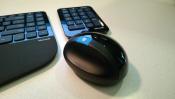
The Sculpt Ergonomic Mouse is also designed for healthy computing with a unique ergonomic shape that encourages natural postures. The mouse is taller than most mice to reduce the contact between desktop surface and the underside of your hand, which helps minimize carpal tunnel pressure. And the angle of the mouse puts the forearm in a more relaxed position. All these ergonomic benefits should change the way you feel when using a mouse for long periods of time. The mouse also features the Windows button for quick access to your Start screen in Windows 8, a back button for quick navigation, and a four-way scroll wheel (horizontal and vertical scrolling).
The Sculpt Ergonomic Desktop is now available for an suggested retail price of $129.95 (U.S.). The Sculpt Ergonomic Mouse will also be available separately for an suggested retail price of $59.95 (U.S.).
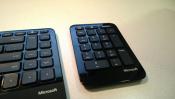
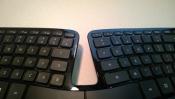
Microsoft explains that the Sculpt Ergonomic Desktop is a combination of the Sculpt Ergonomic Keyboard and the Sculpt Ergonomic Mouse. The keyboard incorporates a split layout. When I first laid eyes on the keyboard, it looked as though it came from the future with the way the keyboard was split. Then when I put my hands on it, it felt like the keyboard naturally “fit” my hands. This split keyboard layout is designed to help position the wrists and forearms in a natural, relaxed position.
The Sculpt Ergonomic Mouse is also designed for healthy computing with a unique ergonomic shape that encourages natural postures. The mouse is taller than most mice to reduce the contact between desktop surface and the underside of your hand, which helps minimize carpal tunnel pressure. And the angle of the mouse puts the forearm in a more relaxed position. All these ergonomic benefits should change the way you feel when using a mouse for long periods of time. The mouse also features the Windows button for quick access to your Start screen in Windows 8, a back button for quick navigation, and a four-way scroll wheel (horizontal and vertical scrolling).
The Sculpt Ergonomic Desktop is now available for an suggested retail price of $129.95 (U.S.). The Sculpt Ergonomic Mouse will also be available separately for an suggested retail price of $59.95 (U.S.).
Comments
