


Microsoft SkyDrive update adds Bing-powered OCR features
Posted by: Jon Ben-Mayor on 08/29/13 02:50 am
[
 Comments
]
Comments
]
A new update was released by Microsoft for their cloud storage service which added Bing OCR (Optical Character Recognition) features to SkyDrive. The update was added in order to make it possible to extract the text from photos in your camera roll when viewing them on the SkyDrive site.

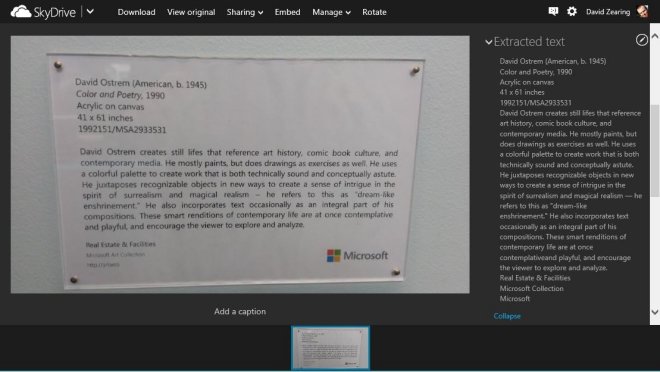
"Most of us can think of a time that we took a picture of something that we really just wanted the text from. It could have been a photo of a product label at a store, a picture of a magazine article or ad, or a snapshot of a sign with info you wanted to remember. When you take photos with your Windows Phone (with auto-upload turned on) today, we send them to your SkyDrive camera roll folder. With this new SkyDrive release, our OCR tool will automatically run on your camera roll photos so you can instantly see the extracted text whenever you view your photos on SkyDrive.com. For example, here’s a photo of an artwork label, with the text extracted and shown in the Properties pane."
Tech Crunch points that the Bing OCR control, it’s worth noting, is currently only available to developers who are working on Windows 8 and Windows 8.1 store apps. It’s not available for developers who want to use it in their web apps, though Bing clearly made an exception for the SkyDrive team.
"Most of us can think of a time that we took a picture of something that we really just wanted the text from. It could have been a photo of a product label at a store, a picture of a magazine article or ad, or a snapshot of a sign with info you wanted to remember. When you take photos with your Windows Phone (with auto-upload turned on) today, we send them to your SkyDrive camera roll folder. With this new SkyDrive release, our OCR tool will automatically run on your camera roll photos so you can instantly see the extracted text whenever you view your photos on SkyDrive.com. For example, here’s a photo of an artwork label, with the text extracted and shown in the Properties pane."
Tech Crunch points that the Bing OCR control, it’s worth noting, is currently only available to developers who are working on Windows 8 and Windows 8.1 store apps. It’s not available for developers who want to use it in their web apps, though Bing clearly made an exception for the SkyDrive team.
Comments
