


Morning after AV software report
Posted by: Timothy Weaver on 07/29/2014 10:25 AM
[
 Comments
]
Comments
]
An arduous, months-long test by AV-Test Institute evaluated which products do the best cleanup job on a previously infected machine. The testers disabled the AV software on a clean machine, installed the malware and then re-abled the AV software. The outcomes were:
(1:complete removal of the malware, leaving a totally clean system.
(2:Cleanup that left behind only non-executable junk.
(3:A product that detects the malware but leaves behind executable components.
This is a remediation test, with all samples chosen because all of the products are known to detect them. Even so, when faced with a real-world situation, a couple failed to even detect the problem. Avira Free AntiVirus and Microsoft Security Essentials each missed one sample completely.
In this latest test from AV-Test, Malwarebytes was the only product to achieve a perfect score, every single threat completely wiped out. This result is more in keeping with Malwarebytes's reputation as the go-to tool for malware cleanup.
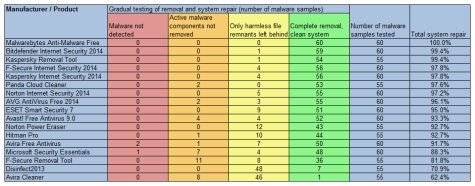
You can see the full report on line.
(1:complete removal of the malware, leaving a totally clean system.
(2:Cleanup that left behind only non-executable junk.
(3:A product that detects the malware but leaves behind executable components.
This is a remediation test, with all samples chosen because all of the products are known to detect them. Even so, when faced with a real-world situation, a couple failed to even detect the problem. Avira Free AntiVirus and Microsoft Security Essentials each missed one sample completely.
In this latest test from AV-Test, Malwarebytes was the only product to achieve a perfect score, every single threat completely wiped out. This result is more in keeping with Malwarebytes's reputation as the go-to tool for malware cleanup.
You can see the full report on line.
Comments
