


New Malware PUP Resets Browser Proxy Server and Locks It
Posted by: Timothy Weaver on 01/07/2016 05:33 AM
[
 Comments
]
Comments
]
Although not very widespread at this point, MalwareBytes researchers have identified a new piece of malware that locks your browsers default proxy setting.
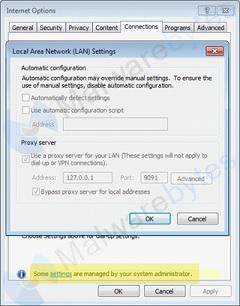 WebSearcher PUP (potentially unwanted program), when downloaded, resets the permissions on the three most popular browsers to only use the proxy that the adware sender wants. It also places a note stating that these settings are controlled by the system administrator in an attempt to convince the victim that all is well with the computer.
With Internet Explorer the proxy settings are not only filled in by the adware, but also set so the user cannot make changes.
Malwarebytes researcher Pieter Arntz said that the PUP was first seen on December 29 and its usage is not believed to be widespread at this point.
Source: SCMagazine
WebSearcher PUP (potentially unwanted program), when downloaded, resets the permissions on the three most popular browsers to only use the proxy that the adware sender wants. It also places a note stating that these settings are controlled by the system administrator in an attempt to convince the victim that all is well with the computer.With Internet Explorer the proxy settings are not only filled in by the adware, but also set so the user cannot make changes.
Malwarebytes researcher Pieter Arntz said that the PUP was first seen on December 29 and its usage is not believed to be widespread at this point.
Source: SCMagazine
Comments
