Providing Free and Editor Tested Software Downloads
< HOME | TUTORIALS | GEEK-CADE| WEB TOOLS | YOUTUBE | NEWSLETTER | DEALS! | FORUMS | >

MajorGeeks.com - Don't ya wish your boyfriend was a geek like me?.

Software Categories

All In One Tweaks
Android
Antivirus & Malware
Appearance
Back Up
Browsers
CD\DVD\Blu-Ray
Covert Ops
Drivers
Drives (SSD, HDD, USB)
Games
Graphics & Photos
Internet Tools
Linux Distros
MajorGeeks Windows Tweaks
Multimedia
Networking
Office & Productivity
System Tools

Other news

· How To and Tutorials
· Life Hacks and Reviews
· Way Off Base
· MajorGeeks Deals
· News
· Off Base
· Reviews


Opera One
Everything
you need.
Already
there.
AI assistant
Aria, built right in
Free VPN
No account needed
Ad blocker
Faster, cleaner web
Tab Islands
Grouped browsing
Useful sidebars
Make it yours
No Clunky Extensions Needed.


MajorGeeks Approved.


Download free

spread the word

· YouTube
· Facebook
· Instagram
· Twitter
· Pintrest
· RSS/XML Feeds
· News Blur
· Yahoo
· Symbaloo

about

· Top Freeware Picks
· Malware Removal
· Geektionary
· Useful Links
· About Us
· Copyright
· Privacy
· Terms of Service
· How to Uninstall

top downloads

1. GS Auto Clicker
2. Smart Defrag
3. Macrium Reflect FREE Edition
4. K-Lite Mega Codec Pack
5. MusicBee
6. Microsoft Visual C++ 2015-2022 Redistributable Package
7. Sergei Strelec's WinPE
8. Visual C++ Redistributable Runtimes AIO Repack
9. K-Lite Codec Pack Full
10. McAfee Removal Tool (MCPR)
More >>

top reads

Star How To Set a Metered Connection for a Wi-Fi Network in Windows 11

Star How To View All Installed Programs and Apps in Windows 11

Star How To Find a Drive's File System Type

Star How Much Storage Space Are Your Installed Apps Using in Windows 11?

Star How To Reset and Fix the Settings App in Windows 11

Star How To Remove the Windows 11 Updated Start Menu

Star How To Download a Windows 11 ISO

Star How To Disable Drag Tray

Star How To Boot Into WinRE (Windows Recovery Environment)

Star How To Find the Installation Date of Apps


MajorGeeks.Com » News » June 2015 » New on MajorGeeks: Create Synchronicity

New on MajorGeeks: Create Synchronicity


Posted by: Jon Ben-Mayor on 06/15/2015 03:59 AM [ comments Comments ]


Create Synchronicity is a handy portable backup tool that will synchronize folders on your system as well as perform powerful backups.
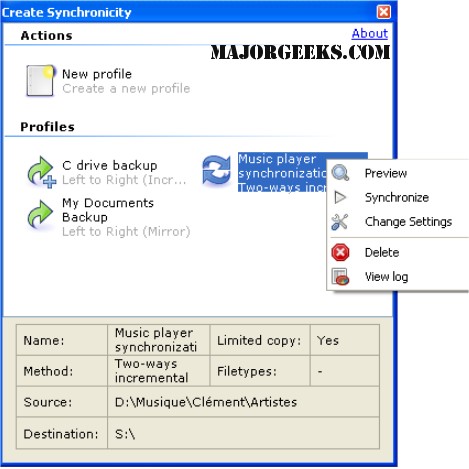


You can use it for pretty much everything from copying your documents, pictures, music and videos to your USB Key or backup drive, to scheduling server backups with regex filtering and DST compensation.

Features:

  • Fully customizable synchronization and backup, including:
  • Precise selection of folders to back up: you can select which folders to synchronize, and even synchronize folders contents without synchronizing subfolders.
  • Files inclusion and exclusion based on filename, extension, or regular expressions.

    Synchronization methods:

  • Mirror
  • One-way incremental
  • Two-ways incremental

  • (v3.5+) Full scheduling support (daily, weekly, monthly, at a particular time, etc.)
  • (v5.1+) Catching up: automatically reschedule missed backups
  • Clean, simple interface
  • Comprehensive previews
  • Comprehensive, pretty logs.
  • Comprehensive documentation, including expert features
  • Support for multiple profiles
  • Fully portable: settings are stored in individual configuration files
  • (v4.0+) By-volume-label paths: Create Synchronicity can backup directly to "My Usb"Documents for example, by automatically locating the drive labeled "My Usb".

    Advanced features:

  • Profile groups
  • Dynamic destinations (%DATE% recognized)
  • Automatic translation of environment variables
  • (v3.5+) Support for UNC (network) and relative paths
  • Loose timing: allow file times to differ by a few seconds
  • File/Folder exclusion using regular expressions
  • (6.0+) Look-backwards date filters: discard files after a custom number of days.

    Command line support:

  • Queue multiple profiles
  • Text-only logs (tab-separated fields)
  • (6.0+) Queue groups of profiles
  • (6.0+) Generate application logs

    Expert mode:

  • File size comparison
  • Integrity checks when scanning and copying
  • GZip / Bzip2 on-the-fly compression
  • (6.0+) Pre-/Post-sync hook scripts: send yourself an e-mail when a backup completes!

    Download @ http://www.majorgeeks.com/files/details/create_synchronicity.html


  • « Random Photo: Getting Loaded at the Local Bar · New on MajorGeeks: Create Synchronicity · Canada Outlaws Spam »


    Comments
    comments powered by Disqus

    MajorGeeks.Com » News » June 2015 » New on MajorGeeks: Create Synchronicity

    © 2000-2026 MajorGeeks.com
    Powered by Contentteller® Business Edition
