


New on MajorGeeks: Mouse Lock
Posted by: Jon Ben-Mayor on 01/28/2016 02:47 AM
[
 Comments
]
Comments
]
Mouse Lock is an easy-to-use utility for locking your screen and mouse, it can dim your desktop kill the task manager as well as providing a mouse trap (confinement of mouse movements).
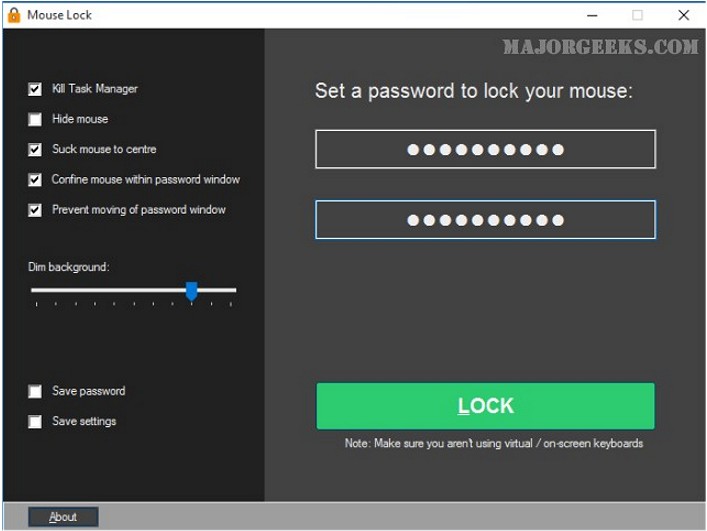
It does not show your password, which can be a little uncomfortable but it does turn green to let you know the passwords match. Save password and save settings are off by default so watch for those. You can optionally kill the task manager, hide the mouse, dim the screen and more. You also don’t want to be using a virtual or on-screen keyboard.
Failed attempts to enter a password are shown in a log file when you enter the correct password - perfect for review of breach attempts.
Mouse Lock does exactly what it promises simply and easily and runs as a portable application. There are numerous ways to lock your computer but if you don’t want to lock your screen in Windows or install an application this might be the one you’re looking for.
Download @ http://www.majorgeeks.com/files/details/mouse_lock.html
It does not show your password, which can be a little uncomfortable but it does turn green to let you know the passwords match. Save password and save settings are off by default so watch for those. You can optionally kill the task manager, hide the mouse, dim the screen and more. You also don’t want to be using a virtual or on-screen keyboard.
Failed attempts to enter a password are shown in a log file when you enter the correct password - perfect for review of breach attempts.
Mouse Lock does exactly what it promises simply and easily and runs as a portable application. There are numerous ways to lock your computer but if you don’t want to lock your screen in Windows or install an application this might be the one you’re looking for.
Download @ http://www.majorgeeks.com/files/details/mouse_lock.html
Comments
