


New on MajorGeeks: OS Beep Codes Verifier
Posted by: Jon Ben-Mayor on 01/12/2018 02:26 AM
[
 Comments
]
Comments
]
OS Beep Codes Verifier will help explain most BIOS beep error codes allowing you to identify major computer problems quickly.
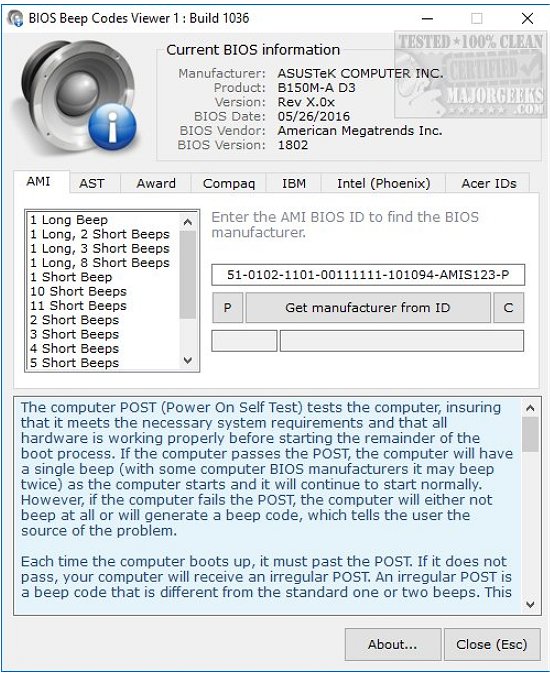
BIOS Beep Codes Verifier can detect your current motherboard, and recognized our BIOS correctly, although that's probably not going to help. Instead, you can extract this portable app to any computer or thumb drive to look up and find what those beeps are trying to tell you.
You can either enter the BIOS ID or chose from AMI, AST, Award, Compaq, IBM, Intel (Phoenix), or Acer IDs. Because beep codes vary from BIOS to BIOS, this makes it very simple to determine what BIOS you have or even guess if you're not sure. Some BIOS, including Intel, can vary and be complicated.
BIOS Beep Codes Verifier is a must-have tool for anyone who works on computers. It solves an annoying problem and could save a tech many hours.
Download @ http://www.majorgeeks.com/files/details/bios_beep_codes_verifier.html
BIOS Beep Codes Verifier can detect your current motherboard, and recognized our BIOS correctly, although that's probably not going to help. Instead, you can extract this portable app to any computer or thumb drive to look up and find what those beeps are trying to tell you.
You can either enter the BIOS ID or chose from AMI, AST, Award, Compaq, IBM, Intel (Phoenix), or Acer IDs. Because beep codes vary from BIOS to BIOS, this makes it very simple to determine what BIOS you have or even guess if you're not sure. Some BIOS, including Intel, can vary and be complicated.
BIOS Beep Codes Verifier is a must-have tool for anyone who works on computers. It solves an annoying problem and could save a tech many hours.
Download @ http://www.majorgeeks.com/files/details/bios_beep_codes_verifier.html
Comments
