Providing Free and Editor Tested Software Downloads
< HOME | TUTORIALS | GEEK-CADE| WEB TOOLS | YOUTUBE | NEWSLETTER | DEALS! | FORUMS | >

Warning: Use of this site may cause you to excessively download cool programs and feel geeky.

Software Categories

All In One Tweaks
Android
Antivirus & Malware
Appearance
Back Up
Browsers
CD\DVD\Blu-Ray
Covert Ops
Drivers
Drives (SSD, HDD, USB)
Games
Graphics & Photos
Internet Tools
Linux Distros
MajorGeeks Windows Tweaks
Multimedia
Networking
Office & Productivity
System Tools

Other news

· How To and Tutorials
· Life Hacks and Reviews
· Way Off Base
· MajorGeeks Deals
· News
· Off Base
· Reviews


Opera One
Everything
you need.
Already
there.
AI assistant
Aria, built right in
Free VPN
No account needed
Ad blocker
Faster, cleaner web
Tab Islands
Grouped browsing
Useful sidebars
Make it yours
No Clunky Extensions Needed.


MajorGeeks Approved.


Download free

spread the word

· YouTube
· Facebook
· Instagram
· Twitter
· Pintrest
· RSS/XML Feeds
· News Blur
· Yahoo
· Symbaloo

about

· Top Freeware Picks
· Malware Removal
· Geektionary
· Useful Links
· About Us
· Copyright
· Privacy
· Terms of Service
· How to Uninstall

top downloads

1. GS Auto Clicker
2. Smart Defrag
3. Macrium Reflect FREE Edition
4. K-Lite Mega Codec Pack
5. MusicBee
6. Microsoft Visual C++ 2015-2022 Redistributable Package
7. Sergei Strelec's WinPE
8. K-Lite Codec Pack Full
9. Visual C++ Redistributable Runtimes AIO Repack
10. McAfee Removal Tool (MCPR)
More >>

top reads

Star How Much Storage Space Are Your Installed Apps Using in Windows 11?

Star How To Reset and Fix the Settings App in Windows 11

Star How To Remove the Windows 11 Updated Start Menu

Star How To Download a Windows 11 ISO

Star How To Disable Drag Tray

Star How To Boot Into WinRE (Windows Recovery Environment)

Star How To Find the Installation Date of Apps

Star Recently Opened Files - How To Hide or Show Them In Jump Lists, File Explorer, and Start Menu

Star How To Change the Name of a Local or Microsoft Account

Star How To Remove OneDrive From the Navigation Pane in File Explorer


MajorGeeks.Com » News » June 2016 » New Tech Scam Impersonates Victims ISP

New Tech Scam Impersonates Victims ISP


Posted by: Timothy Weaver on 06/23/2016 06:17 AM [ comments Comments ]


Tech scammers are trying a new trick to steal your info. Instead of cold calls, they are sending fake pop-up messages that are looking like messages sent from your ISP.
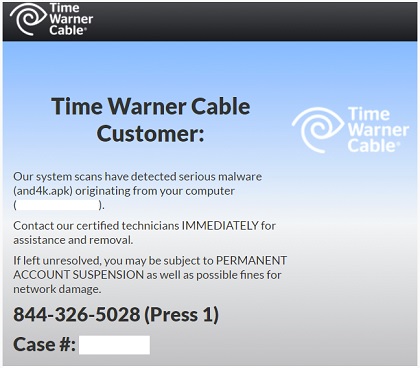
These fake messages are created to look like they come from Verizon, AT&T and TimeWarner. They say that they have detected malware on the users’ computer. If left unattended, the user could have issues with their documents, passwords, and credit card information.


Some of the newer messages go a step further and say: “If left unresolved, you may be subject to PERMANENT ACCOUNT SUSPENSION as well as possible fines for network damage.”

Of course there is a phone number to call and if the user is tricked into calling, the scammers will try to talk the victim into allowing the scammers access to their system. Once the scammers have access, they will steal the victims’ sensitive information (passwords, bank account info, etc.).

The scammers are getting their victims by ad networks. If they click on a malicious ad, they are redirected to a website that checks the computer’s IP address. With that info, the scammers can figure out what ISP is being used. They can then custom the warning message to the correct fake ISP.

Source: Help Net Security


« Random Photo: Trashy Twerk · New Tech Scam Impersonates Victims ISP · Ransomware on the Up Tick »


Comments
comments powered by Disqus

MajorGeeks.Com » News » June 2016 » New Tech Scam Impersonates Victims ISP

© 2000-2026 MajorGeeks.com
Powered by Contentteller® Business Edition
