


New Tech Support Scam Found by BleepingComputer
Posted by: Timothy Weaver on 09/06/16 08:52 am
[
 Comments
]
Comments
]
A new tech support scam, the 1-844-879-7840 Suspicious Activity Tech Support Scam, is a trojan from the Rogue.Tech-Support-Scam family that displays a fake window that tells the victim that suspicious activity has been found on the system.
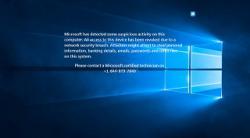 The alert goes on to tell the victim that access to the computer has been removed because of a network breach. This, in reality, is nothing more than a ploy to scare the victim into calling the support number. Of course, like all tech support scams, the hackers will try to sell the victim unnecessary services and software.
"Microsoft has detected some suspicious activity on this computer. All access to this device has been revoked due to a network security breach. Attackers might attempt to steal personal information, banking details, emails, passwords and other files on this system. Please contact a Microsoft certified technician on
+1-844-879-7840"
The trojan is installed along with other software. So it is doubly important to read the license agreement or the installation screens and cancel program if it wants to install other software.
If you have already become infected and paid for the "service", you should call your credit card company and put the transaction into dispute.
Source: Bleeping Computer
The alert goes on to tell the victim that access to the computer has been removed because of a network breach. This, in reality, is nothing more than a ploy to scare the victim into calling the support number. Of course, like all tech support scams, the hackers will try to sell the victim unnecessary services and software."Microsoft has detected some suspicious activity on this computer. All access to this device has been revoked due to a network security breach. Attackers might attempt to steal personal information, banking details, emails, passwords and other files on this system. Please contact a Microsoft certified technician on
+1-844-879-7840"
The trojan is installed along with other software. So it is doubly important to read the license agreement or the installation screens and cancel program if it wants to install other software.
If you have already become infected and paid for the "service", you should call your credit card company and put the transaction into dispute.
Source: Bleeping Computer
Comments
