


NVIDIA Adds Telemetry to Latest Drivers; Here's How to Disable It (Update)
Posted by: Timothy Tibbetts on 11/14/16 12:44 am
[
 Comments
]
Comments
]
Update: I have installed the latest drivers selecting Drivers Only and telemetry is indeed there. So, contrary to some opinions, the fact is that telemetry is installed regardless of whether you use Geforce Experience or not.
It's been brought to our attention that nVIDIA now has telemetry included with its drivers. It also continues the bloat with nVIDIA Wireless Controller and ShadowPlay services, something many don't need.
Telemetry is essentially considered spying by many as it is a way to send data back and forth. It's nowhere near that simple, but we'd like to know what it's doing in our video drivers when it's never been needed before.
nVIDIA Wireless Controller requires you have, you guessed it, a nVIDIA Wireless Controller.
ShadowPlay is a way to capture and record gameplay.
The easiest way to check for, and disable these is to download Microsoft Autoruns. Autoruns is portable, so no installation is needed. Download it and unzip Autoruns.zip into its own folder and double click Autoruns.exe or Autoruns64.exe.
-=Advertisement=-
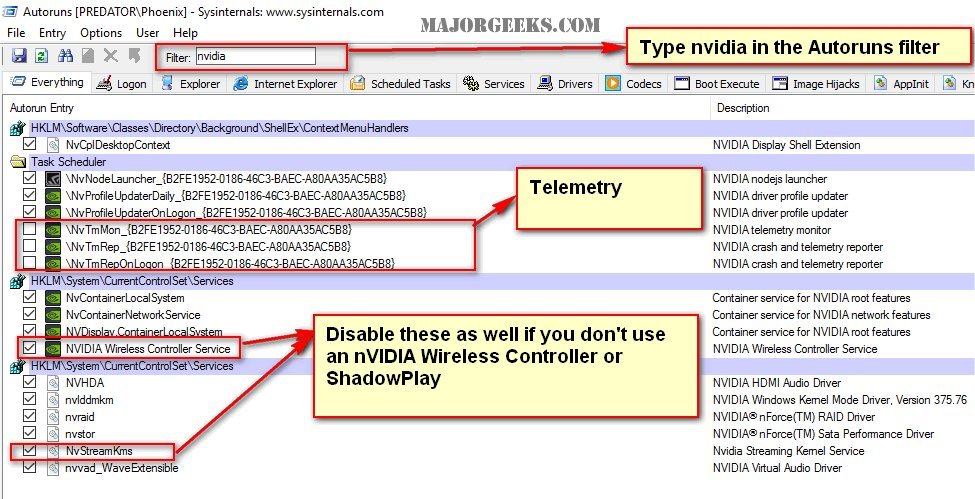
Type nvidia in the filter box.
You will find Telemetry in the Task Scheduler section and the nVIDIA Wireless Controller, and ShadowPlay services further down under the registry entries.
Uncheck what you don't want, close and reboot. If you get an error, close the program and right click on Autoruns.exe or Autoruns64.exe and "Run as Administrator."
Here is an image showing you how to get it done:
And a video if you need a walkthrough:
Whatever happened to a "drivers only" package?
It's been brought to our attention that nVIDIA now has telemetry included with its drivers. It also continues the bloat with nVIDIA Wireless Controller and ShadowPlay services, something many don't need.
The easiest way to check for, and disable these is to download Microsoft Autoruns. Autoruns is portable, so no installation is needed. Download it and unzip Autoruns.zip into its own folder and double click Autoruns.exe or Autoruns64.exe.
Type nvidia in the filter box.
You will find Telemetry in the Task Scheduler section and the nVIDIA Wireless Controller, and ShadowPlay services further down under the registry entries.
Uncheck what you don't want, close and reboot. If you get an error, close the program and right click on Autoruns.exe or Autoruns64.exe and "Run as Administrator."
Here is an image showing you how to get it done:
And a video if you need a walkthrough:
Whatever happened to a "drivers only" package?
Comments
