


Parse Your Entire USB History with USB Historian
Posted by: Timothy Tibbetts on 04/30/17 01:44 am
[
 Comments
]
Comments
]
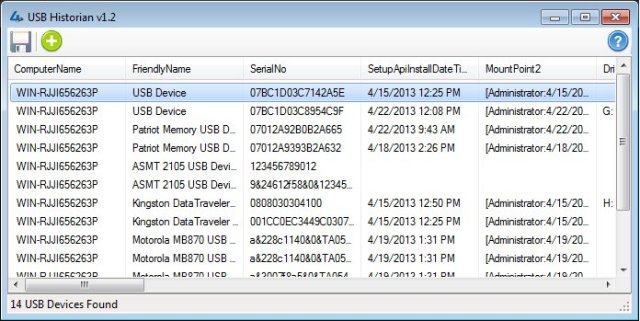
USB Historian can parse your entire USB history from the Plug And Play history in your registry.
Windows records when USB removable storage devices including thumb drives, iPods, cameras, external HDD, etc. are connected and leaves a record of these items in your registry. These can also be found in Plug and Play (PnP) log files as well. You can dig around for them yourself manually or use USB Historian to do it quickly for you.
USB Historian was intended for forensic investigators dealing with the theft, movement, or access to data, making these log files critical to many investigations.
4Discovery also has a list of USB ID's here to help you identify devices you don't recognize as well as references on doing forensics and USB viewing history. The app does contain a cached copy of USB ID’s from http://www.linux-usb.org/usb.ids, so you can quickly reference unrecognized devices from within the program.
USB Historian parses the Computer Name to quickly locate USB devices, displays over 20 attributes, features a wizard-driven analysis, parses SetupAPI Logs and backup logs, and is also able to parse multiple NTUSER.DAT files at the same time.
While you can manually search for this information, I can't see why anyone would bother. USB Historian is free, portable and gives you a wealth of information in minutes that would take you hours to dig for yourself.
Download USB Historian for free @ http://www.majorgeeks.com/files/details/usb_historian.html
Windows records when USB removable storage devices including thumb drives, iPods, cameras, external HDD, etc. are connected and leaves a record of these items in your registry. These can also be found in Plug and Play (PnP) log files as well. You can dig around for them yourself manually or use USB Historian to do it quickly for you.
USB Historian was intended for forensic investigators dealing with the theft, movement, or access to data, making these log files critical to many investigations.
4Discovery also has a list of USB ID's here to help you identify devices you don't recognize as well as references on doing forensics and USB viewing history. The app does contain a cached copy of USB ID’s from http://www.linux-usb.org/usb.ids, so you can quickly reference unrecognized devices from within the program.
USB Historian parses the Computer Name to quickly locate USB devices, displays over 20 attributes, features a wizard-driven analysis, parses SetupAPI Logs and backup logs, and is also able to parse multiple NTUSER.DAT files at the same time.
While you can manually search for this information, I can't see why anyone would bother. USB Historian is free, portable and gives you a wealth of information in minutes that would take you hours to dig for yourself.
Download USB Historian for free @ http://www.majorgeeks.com/files/details/usb_historian.html
Comments
