


Perfecto Encryptor: A Simple Way to Encrypt Files, Folders
Posted by: Jon Ben-Mayor on 08/28/17 01:43 am
[
 Comments
]
Comments
]
Perfecto Encryptor is a straightforward option for encrypting your files and folders.
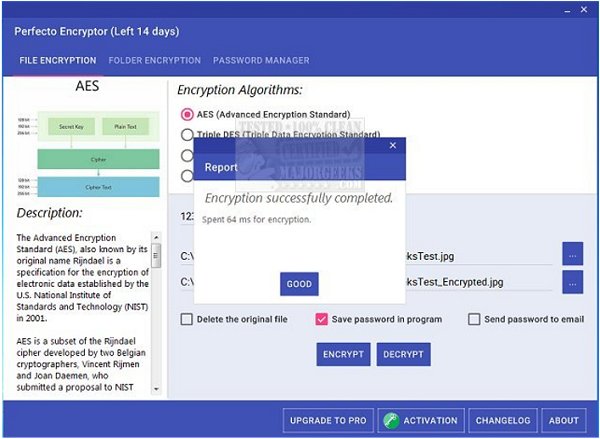
Keep your files and folders secure by encrypting them with four selectable encryption algorithms - AES, Triple DES, DES, and RC2. Once you have chosen the folder or file to encrypt, a password can then be chosen (8 character max) you can then choose the algorithm and hit encrypt. Pretty simple. Perfecto Encryptor's interface is uncluttered and offers a detailed description of the different algorithms that it uses along with accompanying diagrams. The description also includes examples of agencies, etc., that use the specific form of encryption.
Once you have encrypted a file or folder with Perfecto Encryptor only, you will be permitted to decrypt it with your password so make sure you keep track of it. And just for this purpose, there is a handy option that allows you to send your password to a specified email account.
Download @ http://www.majorgeeks.com/files/details/perfecto_encryptor.html
Keep your files and folders secure by encrypting them with four selectable encryption algorithms - AES, Triple DES, DES, and RC2. Once you have chosen the folder or file to encrypt, a password can then be chosen (8 character max) you can then choose the algorithm and hit encrypt. Pretty simple. Perfecto Encryptor's interface is uncluttered and offers a detailed description of the different algorithms that it uses along with accompanying diagrams. The description also includes examples of agencies, etc., that use the specific form of encryption.
Once you have encrypted a file or folder with Perfecto Encryptor only, you will be permitted to decrypt it with your password so make sure you keep track of it. And just for this purpose, there is a handy option that allows you to send your password to a specified email account.
Download @ http://www.majorgeeks.com/files/details/perfecto_encryptor.html
Comments
