


Phishing 101
Posted by: Timothy Weaver on 04/04/15 05:30 am
[
 Comments
]
Comments
]
Phishing attacks usually come in the form of an email or website that looks like it comes from a reputable site, but in fact does not.
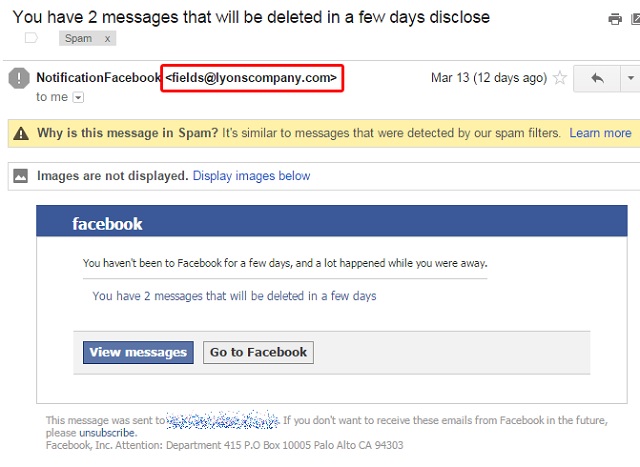
The social media platform has become a very popular tool for phishers in recent years. However, Facebook is not the only form. Hackers will also target banks and financial institutions. The goal of phishing attacks is always the same – to exploit users’ trust in well-known institutions to get their usernames, emails, passwords or PINs.
There are several ways to avoid phishing attacks. The common theme in each is to be highly suspicious of any online request for your personal information.
There are ways to avoid phishing attacks. Follow these basic precautions:
• Never complete a request for personal information that comes in an email.
• Only enter personal information on a secure website. You will know a website is secure if the URL begins with ‘https://‘ and if a lock icon appears in the lower right corner of your Internet browser. Click on that lock icon to view the site’s security certificate.
• Look for telltale signs of forgery in emails that request personal information – spelling errors are immediate red flags. If the prompt to a webpage to enter your data has an URL that is different than the site you expected to be going to, that is a sure sign of a phishing attack.
• Don’t click on links asking for personal information. Instead, go directly to the site in question by typing the URL into your browser manually.
• Make sure your computer’s antivirus suite has phishing protection.
• Make sure your web browser, antivirus and all software programs on your computer are always updated to the latest versions that have the latest security patches.
Source: Kaspersky
The social media platform has become a very popular tool for phishers in recent years. However, Facebook is not the only form. Hackers will also target banks and financial institutions. The goal of phishing attacks is always the same – to exploit users’ trust in well-known institutions to get their usernames, emails, passwords or PINs.
There are several ways to avoid phishing attacks. The common theme in each is to be highly suspicious of any online request for your personal information.
There are ways to avoid phishing attacks. Follow these basic precautions:
• Never complete a request for personal information that comes in an email.
• Only enter personal information on a secure website. You will know a website is secure if the URL begins with ‘https://‘ and if a lock icon appears in the lower right corner of your Internet browser. Click on that lock icon to view the site’s security certificate.
• Look for telltale signs of forgery in emails that request personal information – spelling errors are immediate red flags. If the prompt to a webpage to enter your data has an URL that is different than the site you expected to be going to, that is a sure sign of a phishing attack.
• Don’t click on links asking for personal information. Instead, go directly to the site in question by typing the URL into your browser manually.
• Make sure your computer’s antivirus suite has phishing protection.
• Make sure your web browser, antivirus and all software programs on your computer are always updated to the latest versions that have the latest security patches.
Source: Kaspersky
Comments
