


PyEyeCrypt Allows for Easy Encryption of ClearText
Posted by: Jon Ben-Mayor on 09/29/2015 03:20 AM
[
 Comments
]
Comments
]
PyEyeCrypt allows users to easily encrypt ClearText using their choice of algorithms including AES-128, and then paste the result into their emails for secure sending.
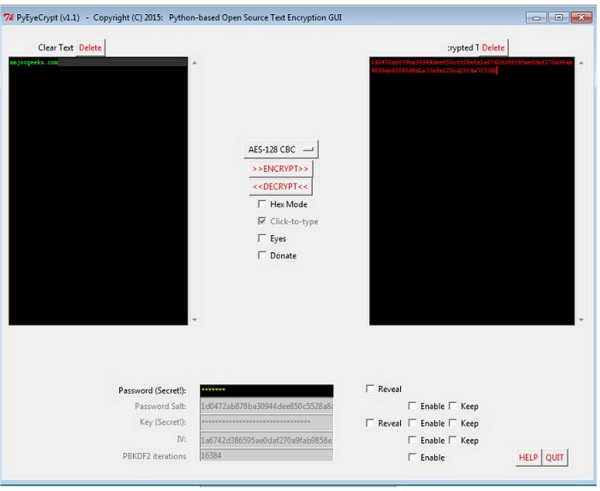
It has 'click-to-type' mode, which invokes "clickable keyboards" - these are coded into the python; i.e. doesn't use operating-system key bindings. This effectively gets around the issue of keylogging and indeed Windows 10 spying on your every keystroke.
When you first fire up PyEyeCrypt and go through the first sequence you will receive the 'Naughty' Operating Systems warning that reads:
'Naughty' Operating System Detected!
Click-to-type mode:
PyEyeCrypt will still run, but ClearText and Passwords MUST be entered using the on-screen 'clickable' keyboards.
This means, for example, that passwords typed by a single recipient using Win10 or Ubuntu could, *unknown to the sender*, expose the sender's password and (possibly) text!
PyEyeCrypt will still run when keylogging is suspected, but ClearText and Passwords MUST be entered using the on-screen 'clickable' keyboards.
Download @ http://www.majorgeeks.com/files/details/pyeyecrypt.html
It has 'click-to-type' mode, which invokes "clickable keyboards" - these are coded into the python; i.e. doesn't use operating-system key bindings. This effectively gets around the issue of keylogging and indeed Windows 10 spying on your every keystroke.
When you first fire up PyEyeCrypt and go through the first sequence you will receive the 'Naughty' Operating Systems warning that reads:
'Naughty' Operating System Detected!
Click-to-type mode:
PyEyeCrypt will still run, but ClearText and Passwords MUST be entered using the on-screen 'clickable' keyboards.
This means, for example, that passwords typed by a single recipient using Win10 or Ubuntu could, *unknown to the sender*, expose the sender's password and (possibly) text!
PyEyeCrypt will still run when keylogging is suspected, but ClearText and Passwords MUST be entered using the on-screen 'clickable' keyboards.
Download @ http://www.majorgeeks.com/files/details/pyeyecrypt.html
Comments
