


Review: Honeywell Wi-Fi Smart Thermostat
Posted by: Timothy Tibbetts on 12/02/16 01:48 am
[
 Comments
]
Comments
]
Our homes are becoming "smarter." The Honeywell Wi-Fi Smart Thermostat is designed to allow you to manage your home thermostat easily.
The Jetsons were not.
So, when my thermostat broke down last year, I decided to look at smart thermostats. It's a perfect fit for a smart home device. How often do you have to change your thermostat temperature? From heat to cool?
Some were very expensive and the lower end ones, with the plain green screens, were just too simple. But 200 bucks? Tough call. Well, I pulled the trigger. I have owned 2, and I have no regrets. Not one.
Wiring may be a tad difficult for those in older homes. For example, there is no C wire setting, however, if you have a G wire, it will work. So just warning you that it took me some trial and error to get it working, and you need to know a little about your wires you have, and how they work, but the manual covers this pretty well. I'm not the handiest guy, but I figured it out.
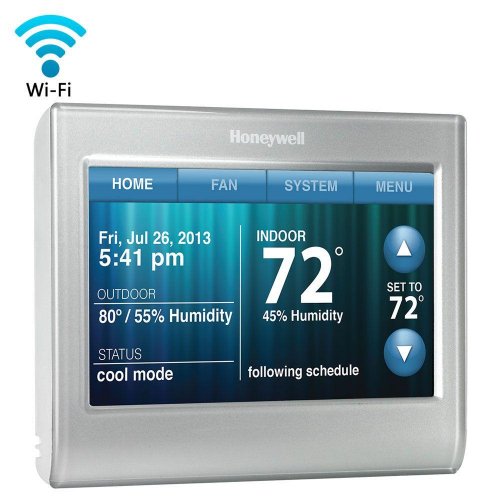
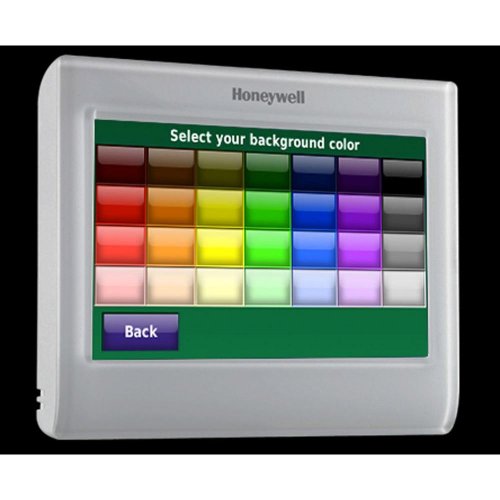
Once you have it installed, you can connect it to the internet. This gives you the date, time, temperature, humidity, status, and more. The touchscreen is beautiful and so easy to use I never read the manual. You can choose from different colors. Sure, there's a lot of features and settings but kudos to the designers of this interface.
Rather than go long, let's look at what this thing can do and cover some of the basics:
Wi-Fi enabled - control from anywhere
Full-color, bright and customizable screen
Smart response technology for the precise temp when you want it
Automatic energy-saving settings that fit your life
Customizable color settings to match your decor
Auto alerts ensure on-time filter changes; know about extreme temps
Local weather conditions including temperature and humidity
Simple set up
Peace of mind - control energy use, ensures safe temps for pets or keeps tabs on a vacation home
Auto-updates for daylight savings; adjusts for 12/24-hour and multi-language needs
Quick schedule changes - update your settings for temporary holds or vacations; restore everyday settings in a snap
Help on demand - onscreen help button answers questions as you go
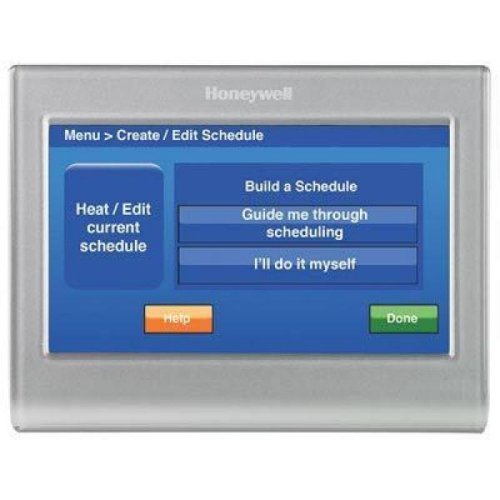
I easily created a schedule. I know I wake up around 6 AM so it automatically reverts to my preferred daytime temperature 2 hours before. At night, my preferred temperature goes on 30 minutes before bedtime. Not using my furnace or air conditioning for almost 3 hours a day while I sleep. If I had a 9-5 job, I could automatically adjust it to whatever I want and have my home all cozy when I return. I could set this for any day, or customize individual days, like weekends. Imagine how much you could save in a few years if your furnace or AC ran less for 12 hours a day! Even working from home, I love it. If for some reason, I wanted to change the temperature a couple of degrees, you just simply press the up or down arrow until you get the desired temperature. Now you can choose to switch to permanent hold, cancel hold or done. Pressing done will leave that temperature you just set until the next scheduled time change. Brilliant.
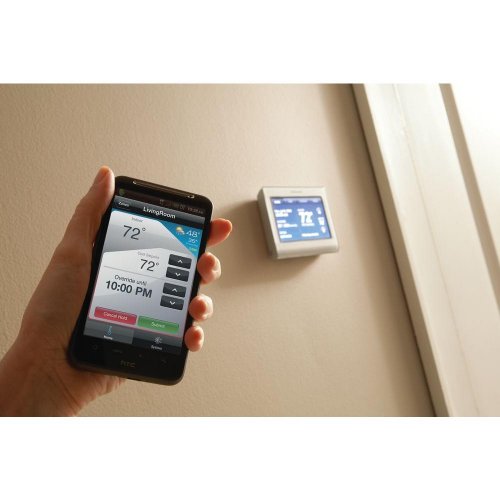
Gone away for a few hours and it turned into all day? Maybe you went out all day and it turned out you're coming home early. No problem. You can access your thermostat with your Android or iOS smartphone and have your home temperature where you want it you get there. You can also do everything from your phone that has been discussed here.
I am sure, over time, this will pay for itself, much like LED bulbs. Yes, $200 is expensive, but factor in the savings and ease of use and I can highly recommend the Honeywell Wi-Fi Smart Thermostat. And nowadays, all of us can appreciate a more energy efficient home.
Now, let's save money. At the time this was written, it is $200 in brick and mortar stores. I wish I had checked Amazon because Honeywell is selling them there for $163.99.
If you're considering one, please consider Amazon. We get a referral and you save almost 40 bucks. I like to think everyone wins! Here's the referral link: Honeywell Wi-Fi Smart Thermostat.
The Jetsons were not.
So, when my thermostat broke down last year, I decided to look at smart thermostats. It's a perfect fit for a smart home device. How often do you have to change your thermostat temperature? From heat to cool?
Some were very expensive and the lower end ones, with the plain green screens, were just too simple. But 200 bucks? Tough call. Well, I pulled the trigger. I have owned 2, and I have no regrets. Not one.
Wiring may be a tad difficult for those in older homes. For example, there is no C wire setting, however, if you have a G wire, it will work. So just warning you that it took me some trial and error to get it working, and you need to know a little about your wires you have, and how they work, but the manual covers this pretty well. I'm not the handiest guy, but I figured it out.
Once you have it installed, you can connect it to the internet. This gives you the date, time, temperature, humidity, status, and more. The touchscreen is beautiful and so easy to use I never read the manual. You can choose from different colors. Sure, there's a lot of features and settings but kudos to the designers of this interface.
Rather than go long, let's look at what this thing can do and cover some of the basics:
I easily created a schedule. I know I wake up around 6 AM so it automatically reverts to my preferred daytime temperature 2 hours before. At night, my preferred temperature goes on 30 minutes before bedtime. Not using my furnace or air conditioning for almost 3 hours a day while I sleep. If I had a 9-5 job, I could automatically adjust it to whatever I want and have my home all cozy when I return. I could set this for any day, or customize individual days, like weekends. Imagine how much you could save in a few years if your furnace or AC ran less for 12 hours a day! Even working from home, I love it. If for some reason, I wanted to change the temperature a couple of degrees, you just simply press the up or down arrow until you get the desired temperature. Now you can choose to switch to permanent hold, cancel hold or done. Pressing done will leave that temperature you just set until the next scheduled time change. Brilliant.
Gone away for a few hours and it turned into all day? Maybe you went out all day and it turned out you're coming home early. No problem. You can access your thermostat with your Android or iOS smartphone and have your home temperature where you want it you get there. You can also do everything from your phone that has been discussed here.
I am sure, over time, this will pay for itself, much like LED bulbs. Yes, $200 is expensive, but factor in the savings and ease of use and I can highly recommend the Honeywell Wi-Fi Smart Thermostat. And nowadays, all of us can appreciate a more energy efficient home.
Now, let's save money. At the time this was written, it is $200 in brick and mortar stores. I wish I had checked Amazon because Honeywell is selling them there for $163.99.
If you're considering one, please consider Amazon. We get a referral and you save almost 40 bucks. I like to think everyone wins! Here's the referral link: Honeywell Wi-Fi Smart Thermostat.
Comments
